
bbr helps manage the entire modeling workflow from within R. Users can submit models, inspect output and diagnostics, and iterate on models. Furthermore, workflow tools—such as simple tagging of models and model inheritance trees—make reproducibility and external review more streamlined.
bbr supports running NONMEM models via the bbi command-line tool, with a focus on non-Bayesian methods. The bbr.bayes package extends bbr to enable Bayesian estimation through either NONMEM or Stan.
Installation
You can install the latest released version of bbr via MPN snapshots from any snapshot date in 2021 or later. (An earlier version of this package was available under the name rbabylon in snapshot dates 2020-03-07 through 2020-12-21.)
You can also install development versions of bbr by downloading the source files for the latest version from https://s3.amazonaws.com/mpn.metworx.dev/releases/bbr/ or get the latest development version from GitHub with:
# install.packages("devtools")
devtools::install_github("metrumresearchgroup/bbr", ref = "main")
Documentation
You can find documentation and a “Getting Started” vignette that shows users how to set up bbr and demonstrates the basic modeling workflow here.
There are several other vignettes, and more are being added as new functionality is rolled out. A complete list can be found here.
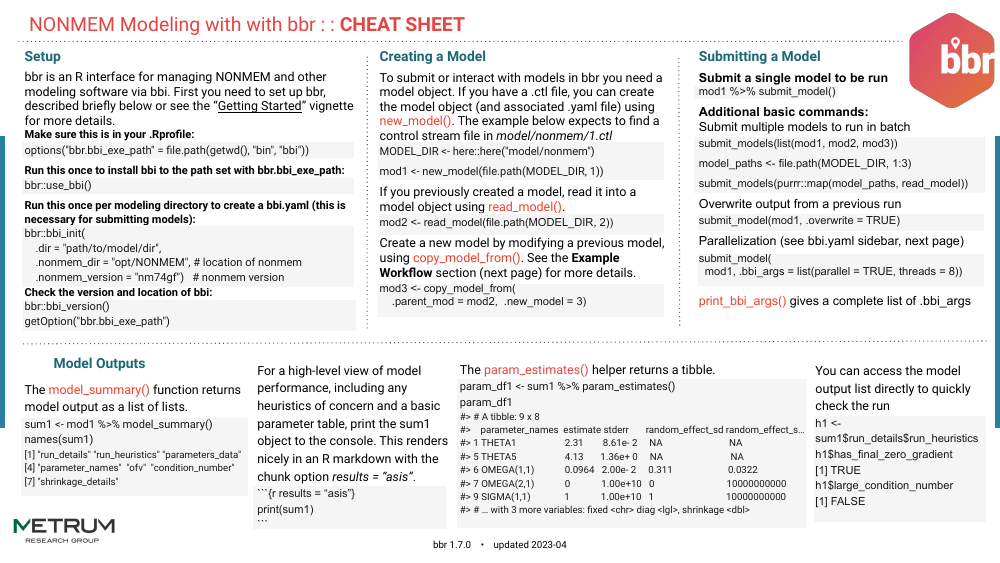
Featured Vignettes
-
Getting Started with bbr – Some basic scenarios for modeling with NONMEM using
bbr, introducing you to its standard workflow and functionality. -
Using the based_on field – How to use the
based_onfield to track a model’s ancestry through the model development process, as well how to leverageconfig_log()to check whether older models are still up-to-date. -
Creating a Model Summary Log – How to use
summary_log()to extract model diagnostics like the objective function value, condition number, and parameter counts.
Development
bbr uses pkgr to manage development dependencies and renv to provide isolation. To replicate this environment,
clone the repo
install pkgr
-
open package in an R session and run
renv::init(bare = TRUE)- install
renv> 0.8.3-4 into default.libPaths()if not already installed
- install
run
pkgr installin terminal within package directoryrestart session
Then, launch R with the repo as the working directory (open the project in RStudio). renv will activate and find the project library.