Plot model coefficients with
ggcoef_model()
Joseph Larmarange
Source:vignettes/ggcoef_model.Rmd
ggcoef_model.RmdThe purpose of ggcoef_model() is to quickly plot the
coefficients of a model. It is an updated and improved version of
GGally::ggcoef() based on
broom.helpers::tidy_plus_plus(). For displaying a nicely
formatted table of the same models, look at
gtsummary::tbl_regression().
Quick coefficients plot
To work automatically, this function requires the
broom.helpers. Simply call ggcoef_model()
with a model object. It could be the result of stats::lm,
stats::glm or any other model covered by
broom.helpers.
data(tips, package = "reshape")
mod_simple <- lm(tip ~ day + time + total_bill, data = tips)
ggcoef_model(mod_simple)
#> `height` was translated to `width`.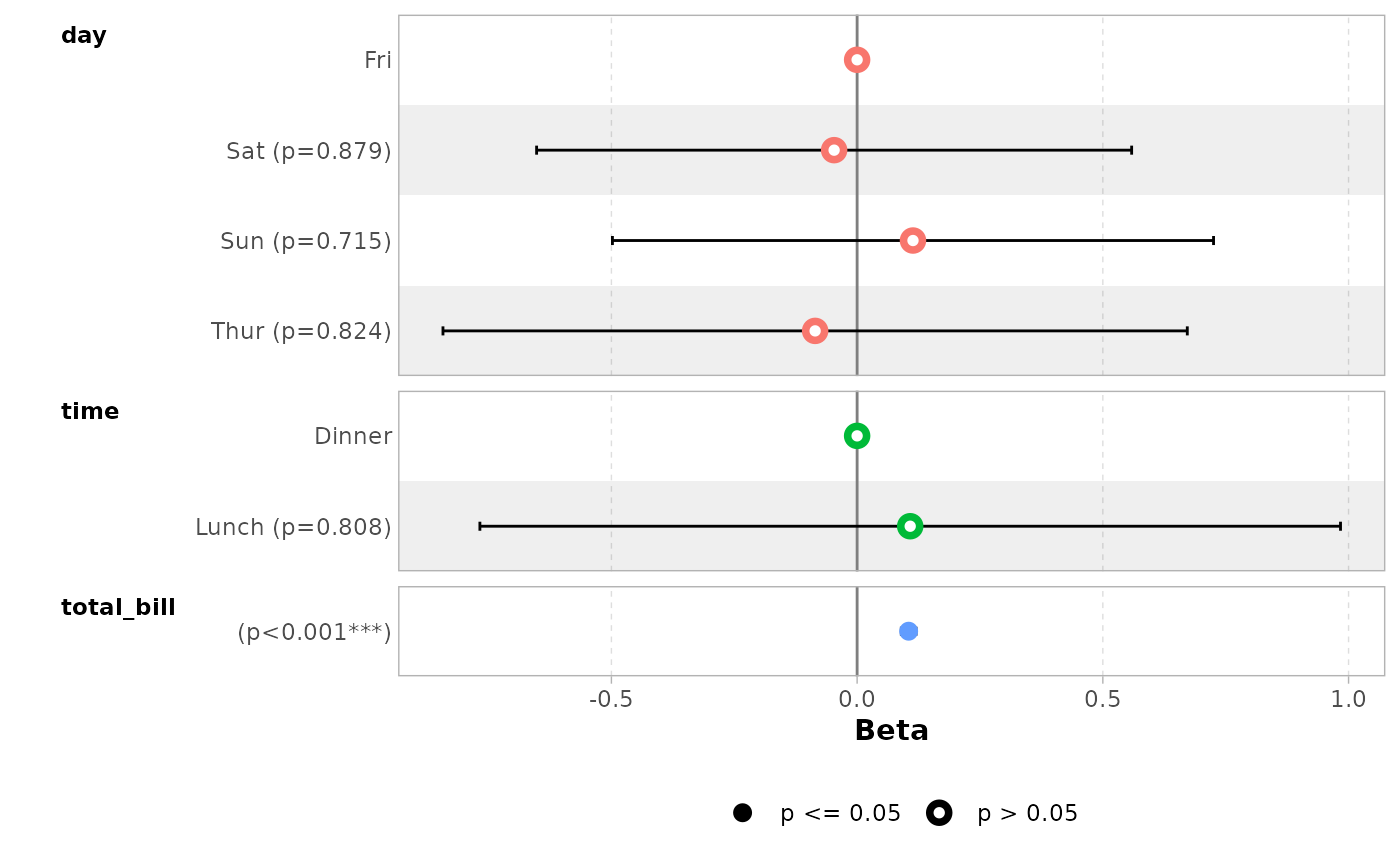
In the case of a logistic regression (or any other model for which
coefficients are usually exponentiated), simply indicated
exponentiate = TRUE. Note that a logarithmic scale will be
used for the x-axis.
d_titanic <- as.data.frame(Titanic)
d_titanic$Survived <- factor(d_titanic$Survived, c("No", "Yes"))
mod_titanic <- glm(
  Survived ~ Sex * Age + Class,
  weights = Freq,
  data = d_titanic,
  family = binomial
)
ggcoef_model(mod_titanic, exponentiate = TRUE)
#> `height` was translated to `width`.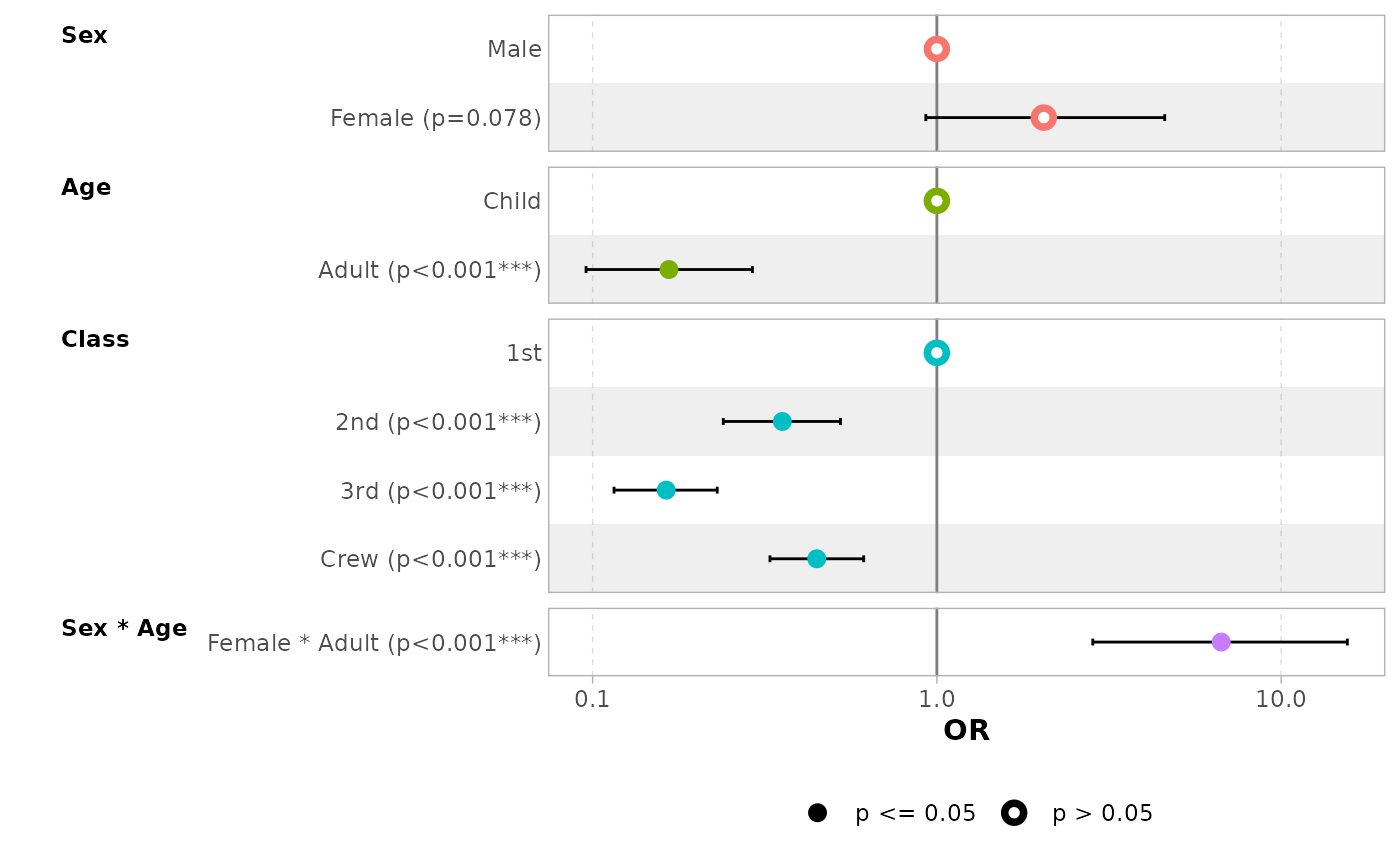
Customizing the plot
Variable labels
You can use the labelled package to define variable
labels. They will be automatically used by ggcoef_model().
Note that variable labels should be defined before computing the
model.
library(labelled)
tips_labelled <- tips |>
  set_variable_labels(
    day = "Day of the week",
    time = "Lunch or Dinner",
    total_bill = "Bill's total"
  )
mod_labelled <- lm(tip ~ day + time + total_bill, data = tips_labelled)
ggcoef_model(mod_labelled)
#> `height` was translated to `width`.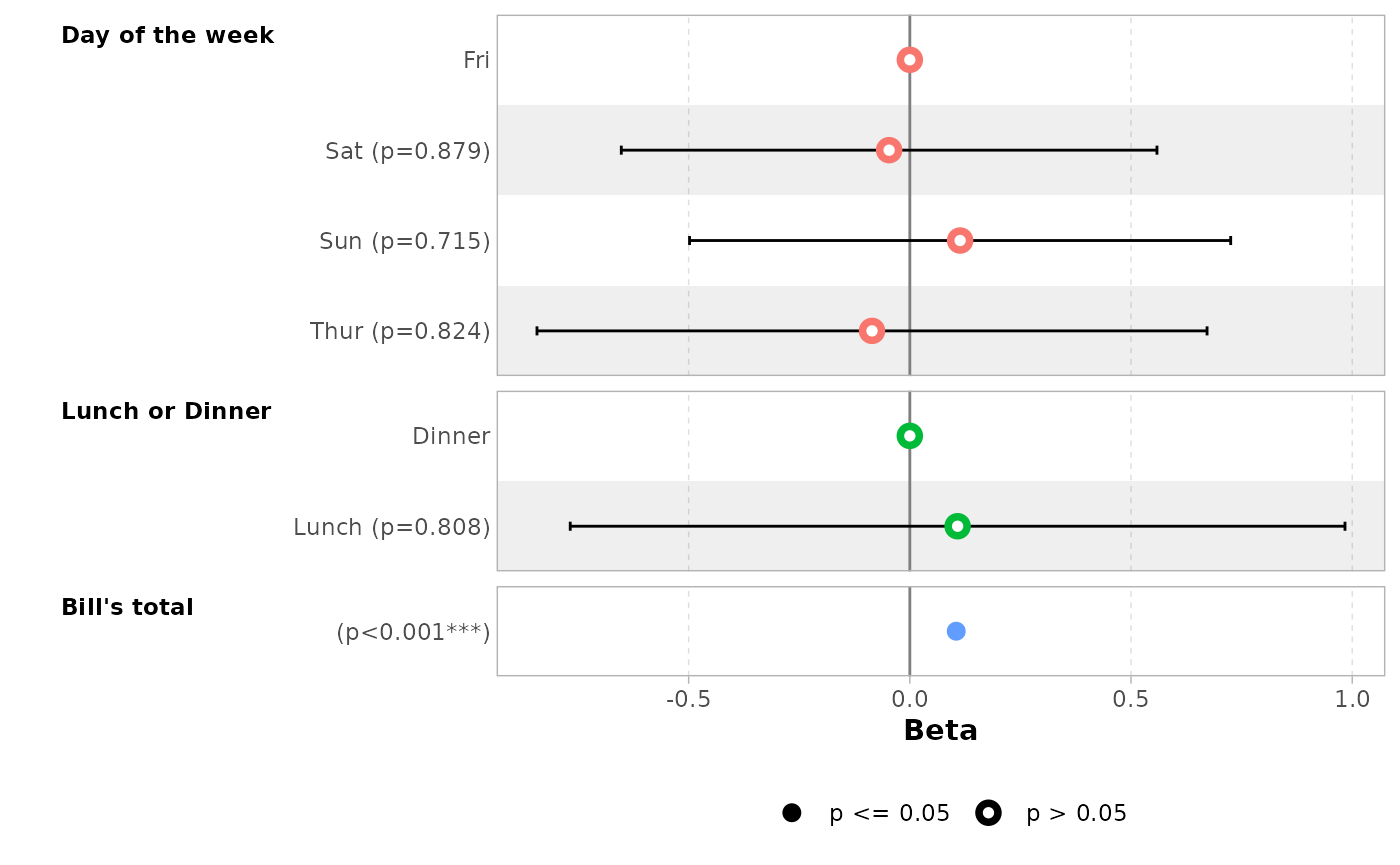
You can also define custom variable labels directly by passing a
named vector to the variable_labels option.
ggcoef_model(
  mod_simple,
  variable_labels = c(
    day = "Week day",
    time = "Time (lunch or dinner ?)",
    total_bill = "Total of the bill"
  )
)
#> `height` was translated to `width`.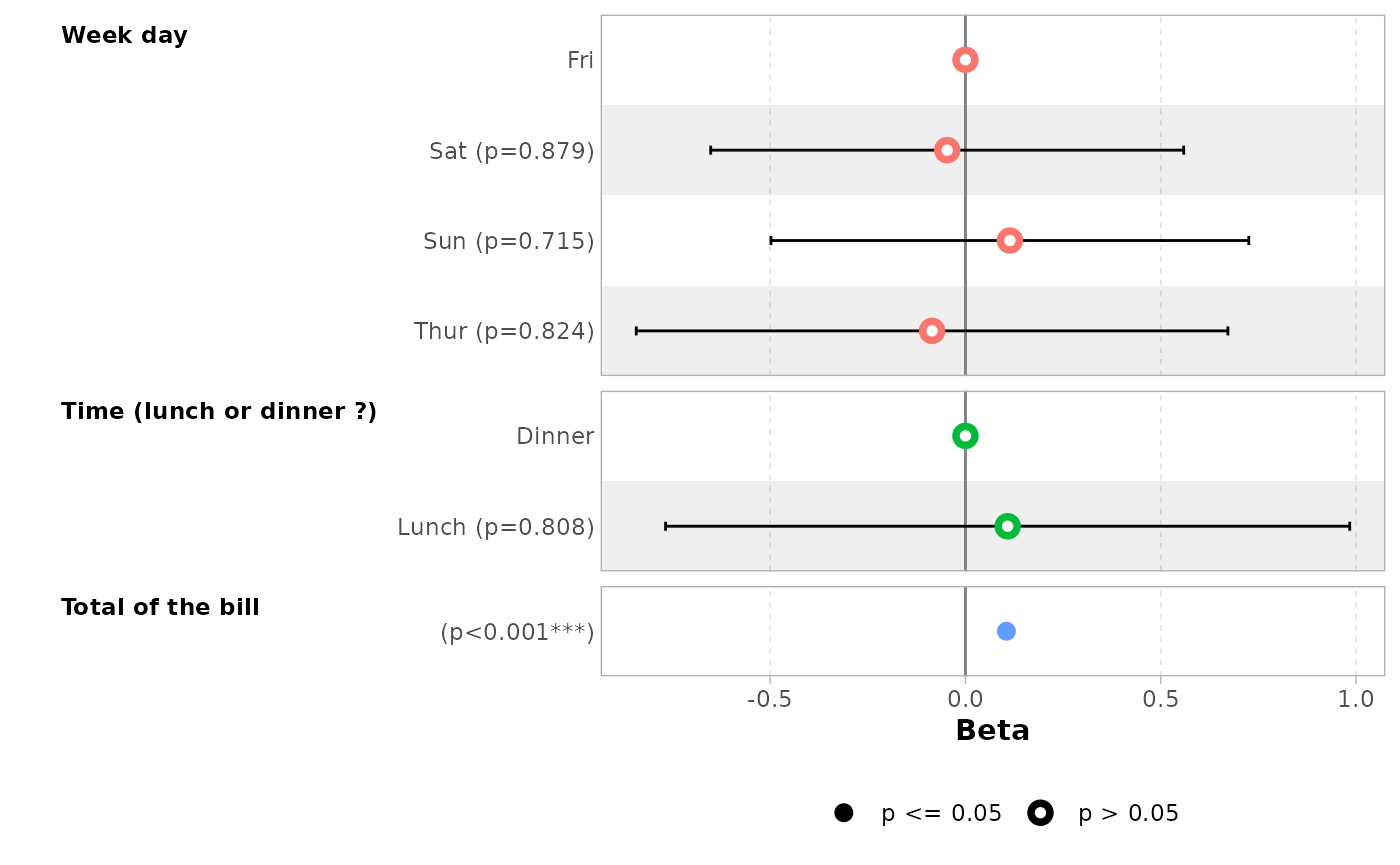
If variable labels are to long, you can pass
ggplot2::label_wrap_gen() or any other labeller function to
facet_labeller.
ggcoef_model(
  mod_simple,
  variable_labels = c(
    day = "Week day",
    time = "Time (lunch or dinner ?)",
    total_bill = "Total of the bill"
  ),
  facet_labeller = ggplot2::label_wrap_gen(10)
)
#> `height` was translated to `width`.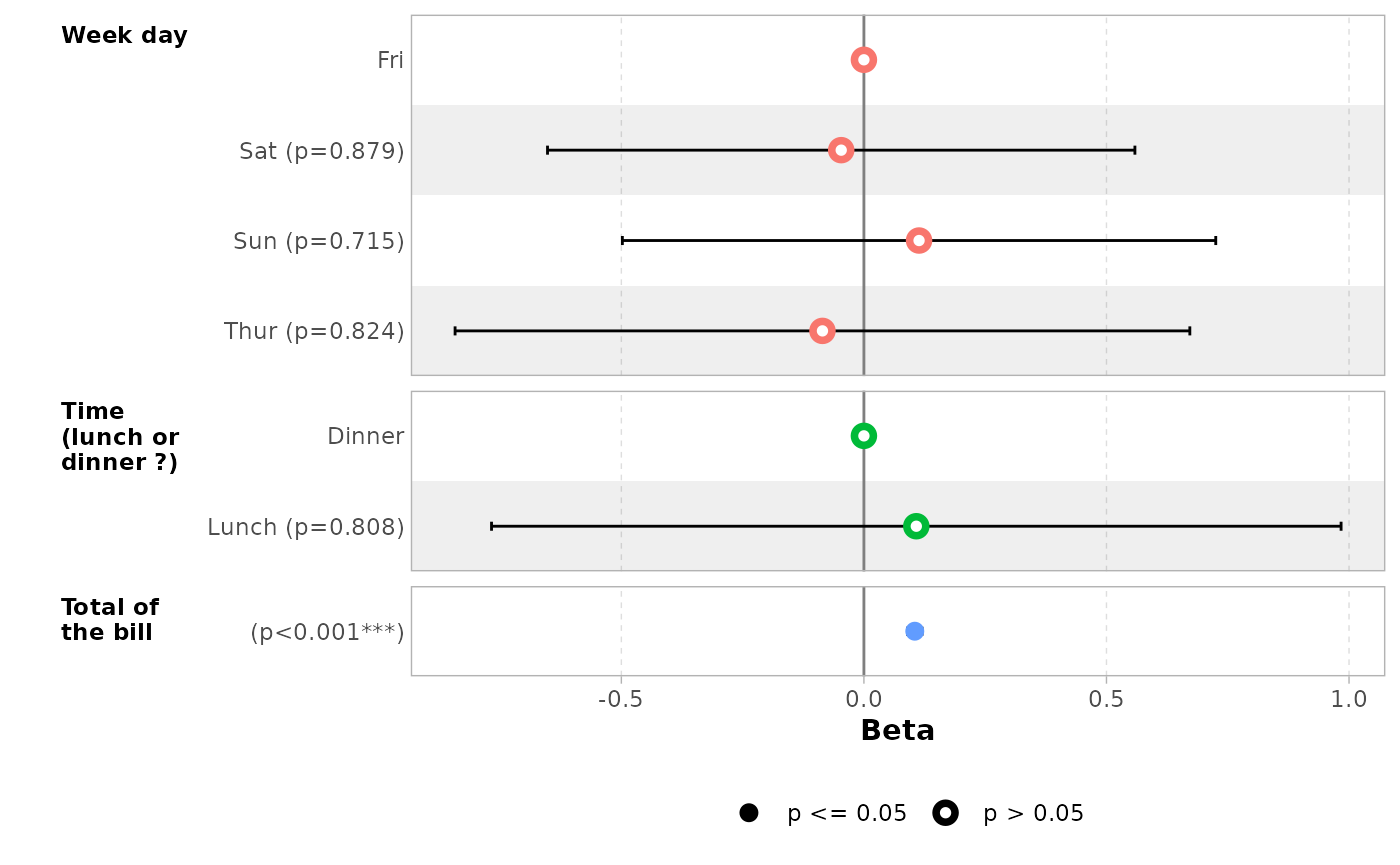
Use facet_row = NULL to hide variable names.
ggcoef_model(mod_simple, facet_row = NULL, colour_guide = TRUE)
#> `height` was translated to `width`.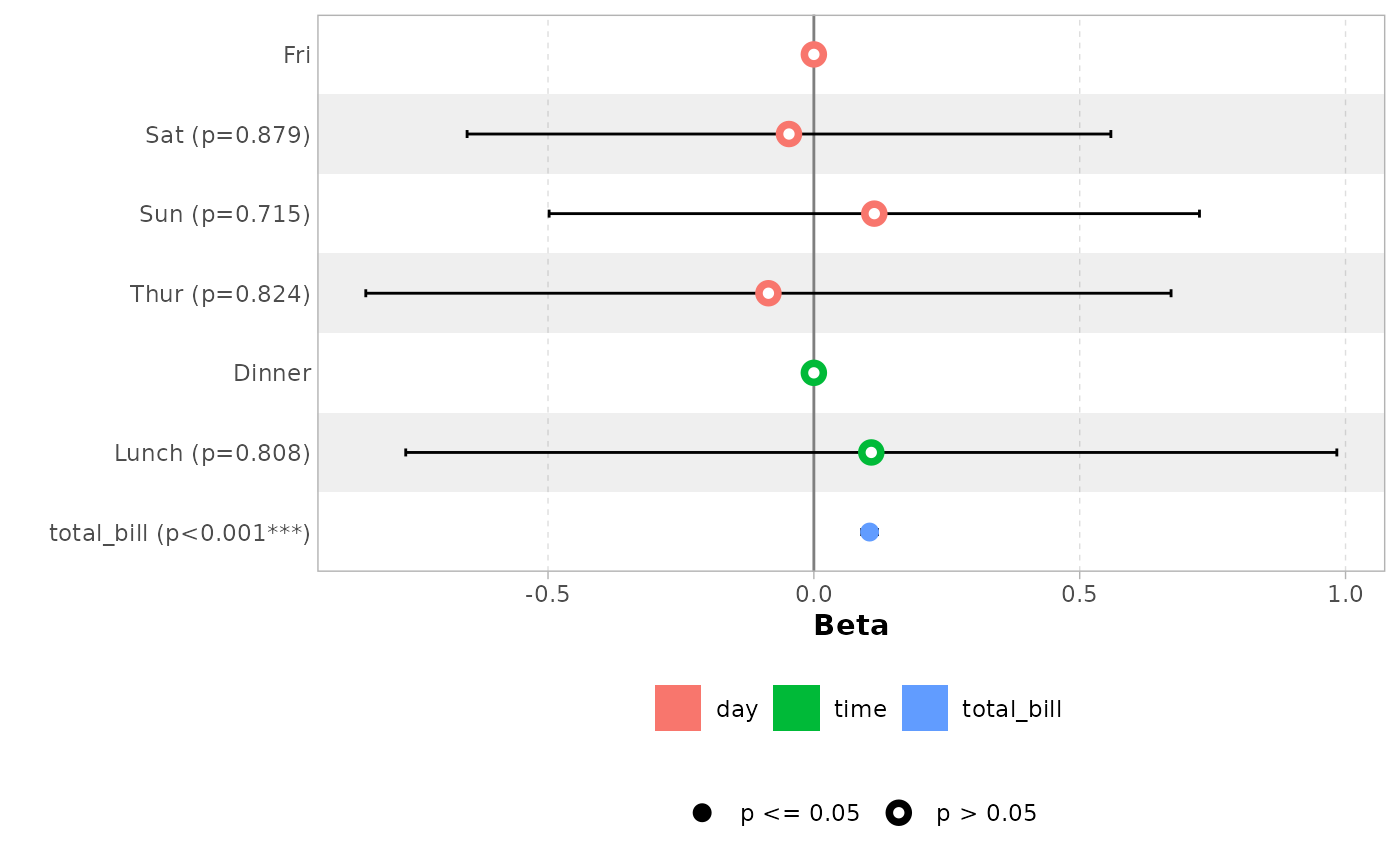
Term labels
Several options allows you to customize term labels.
ggcoef_model(mod_titanic, exponentiate = TRUE)
#> `height` was translated to `width`.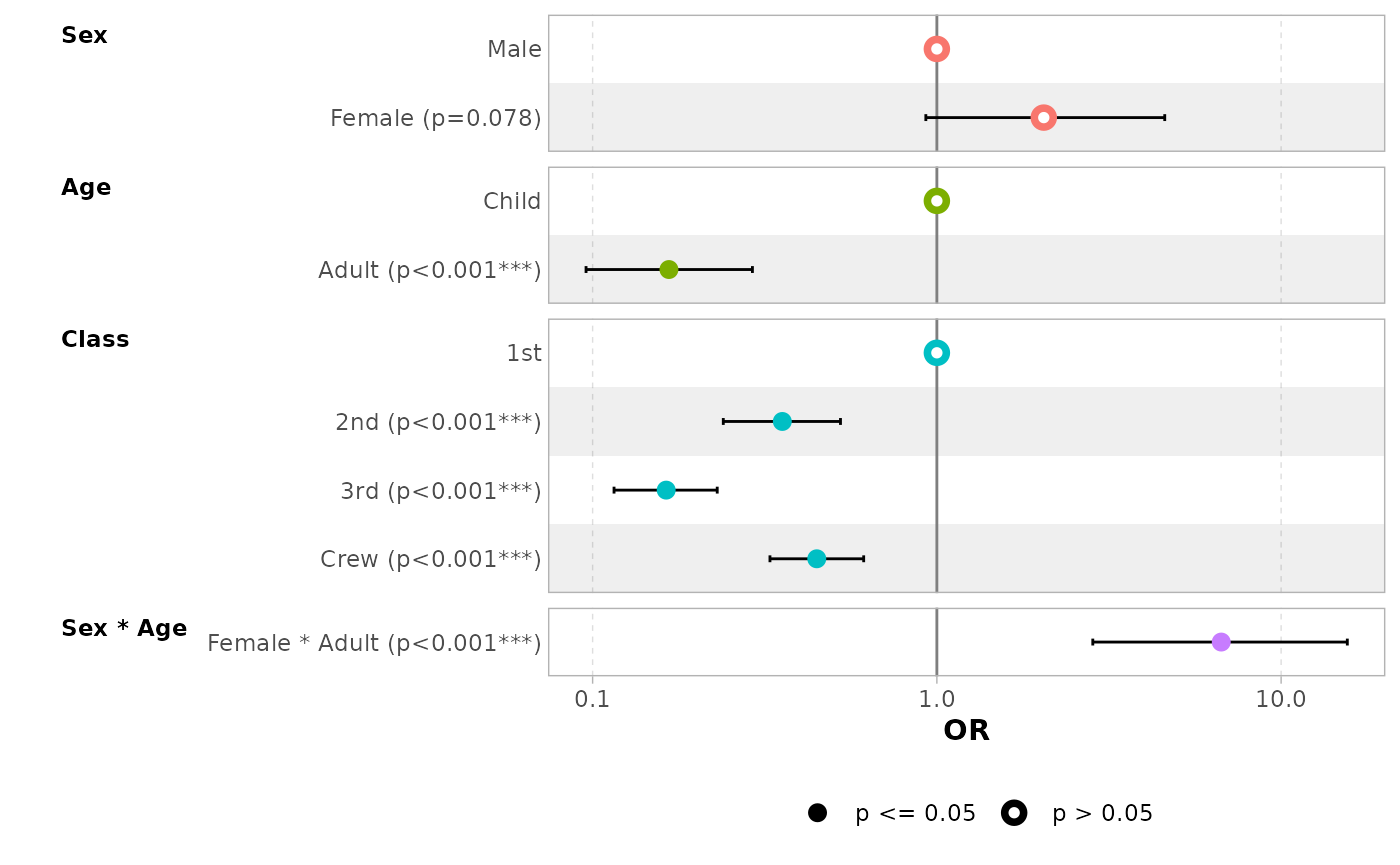
ggcoef_model(
  mod_titanic,
  exponentiate = TRUE,
  show_p_values = FALSE,
  signif_stars = FALSE,
  add_reference_rows = FALSE,
  categorical_terms_pattern = "{level} (ref: {reference_level})",
  interaction_sep = " x "
) +
  ggplot2::scale_y_discrete(labels = scales::label_wrap(15))
#> Scale for y is already present.
#> Adding another scale for y, which will replace the existing scale.
#> `height` was translated to `width`.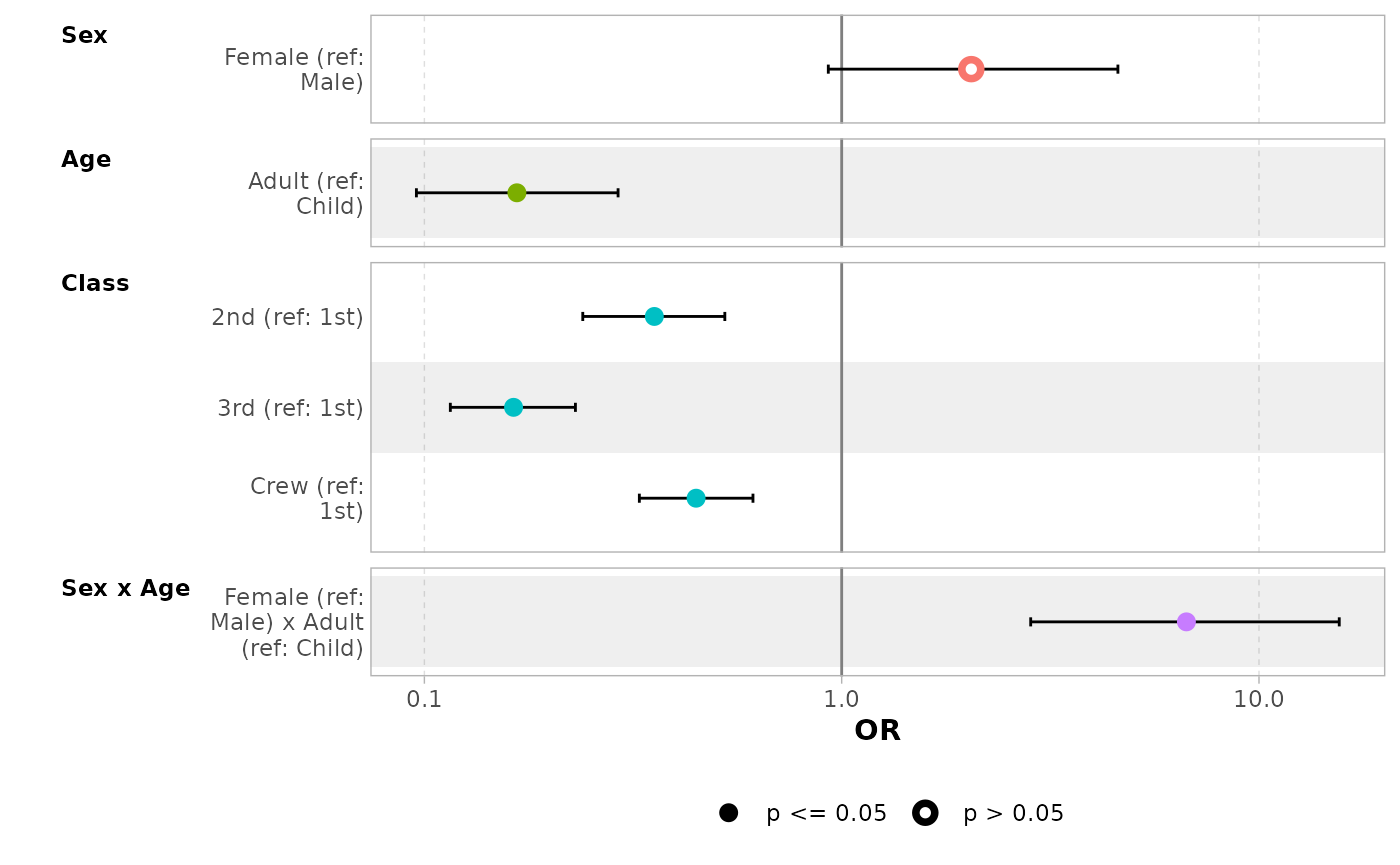
By default, for categorical variables using treatment and sum contrasts, reference rows will be added and displayed on the graph.
mod_titanic2 <- glm(
  Survived ~ Sex * Age + Class,
  weights = Freq,
  data = d_titanic,
  family = binomial,
  contrasts = list(Sex = contr.sum, Class = contr.treatment(4, base = 3))
)
ggcoef_model(mod_titanic2, exponentiate = TRUE)
#> `height` was translated to `width`.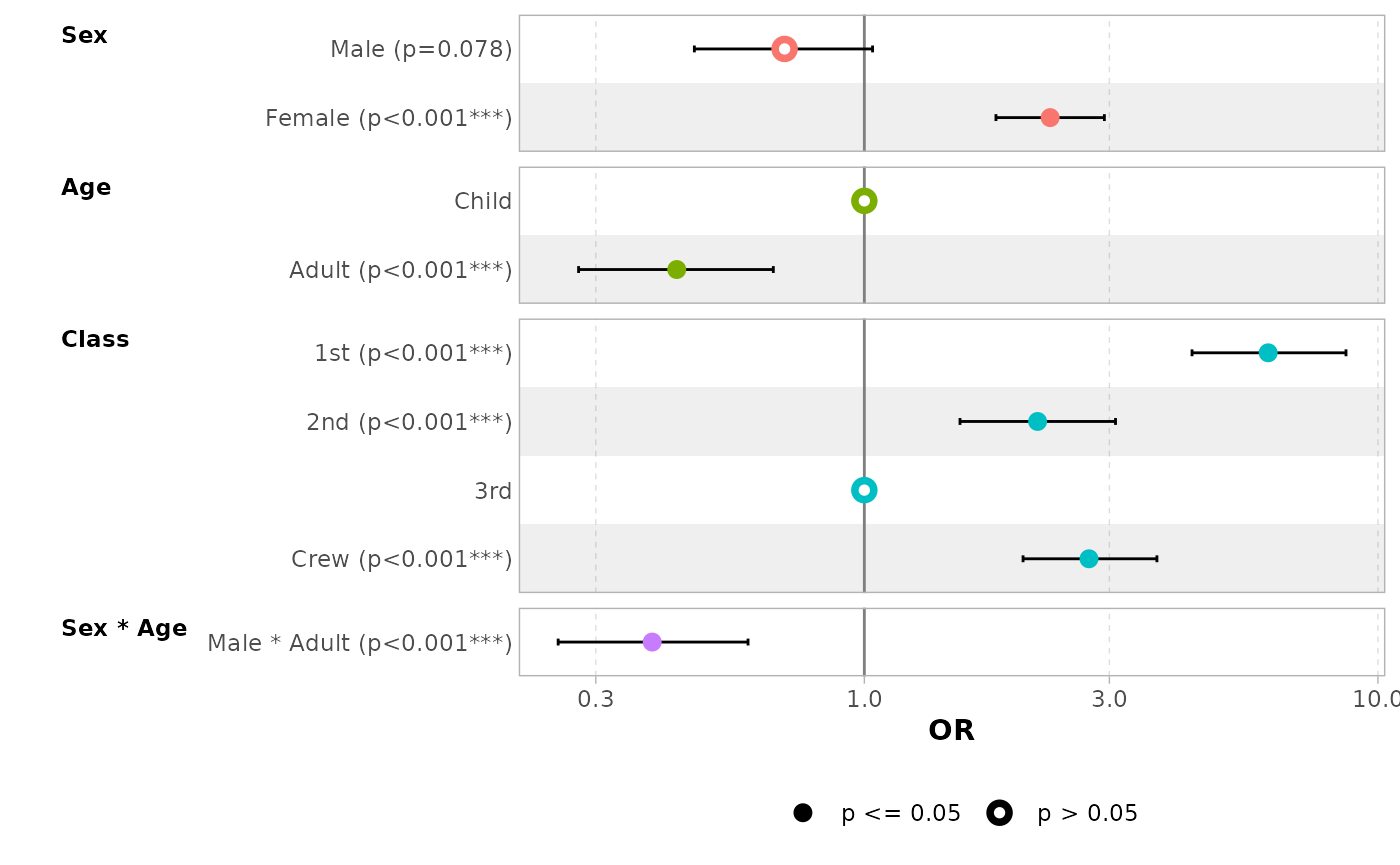
Continuous variables with polynomial terms defined with
stats::poly() are also properly managed.
mod_poly <- lm(Sepal.Length ~ poly(Petal.Width, 3) + Petal.Length, data = iris)
ggcoef_model(mod_poly)
#> `height` was translated to `width`.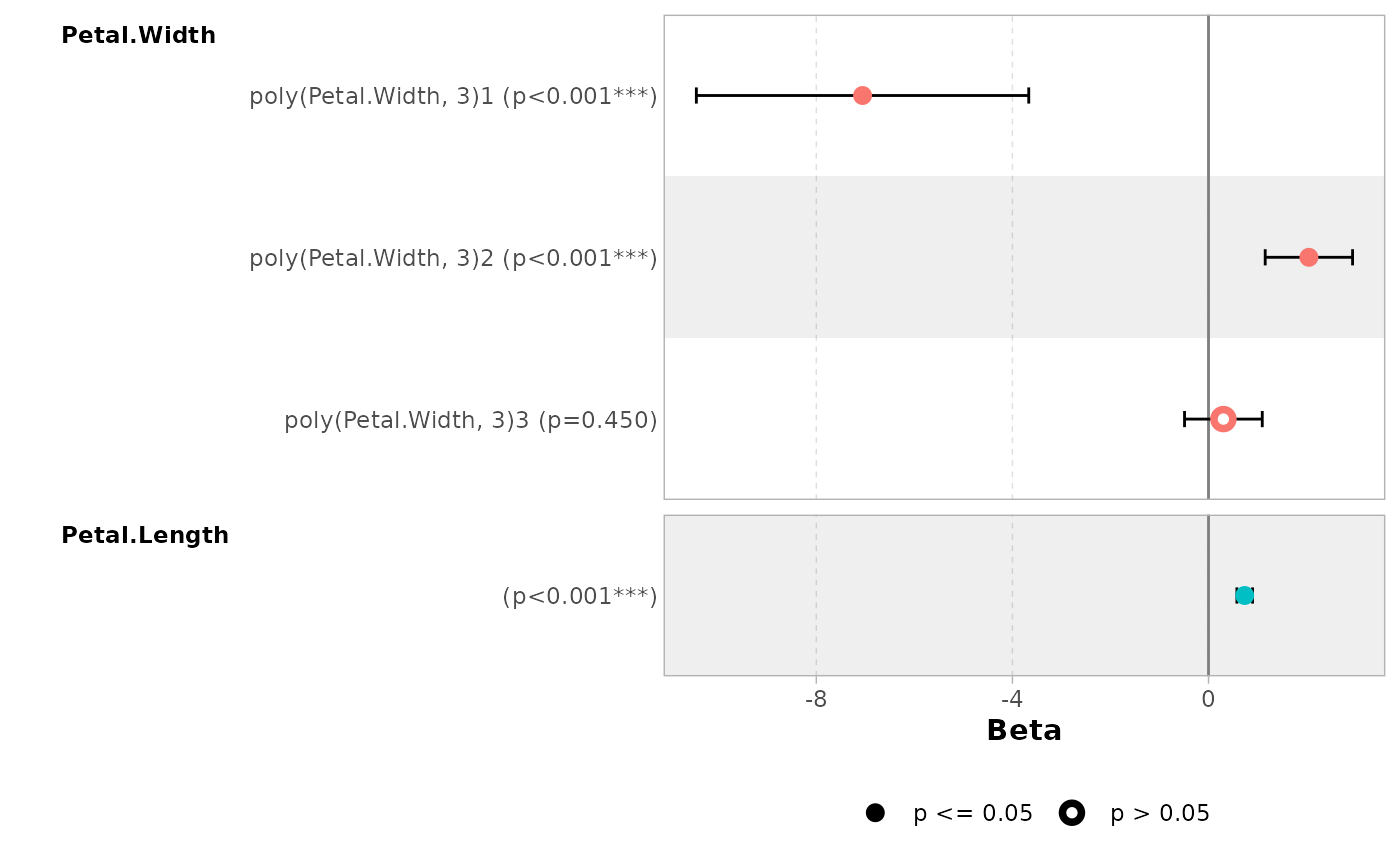
Use no_reference_row to indicate which variables should
not have a reference row added.
ggcoef_model(
  mod_titanic2,
  exponentiate = TRUE,
  no_reference_row = "Sex"
)
#> `height` was translated to `width`.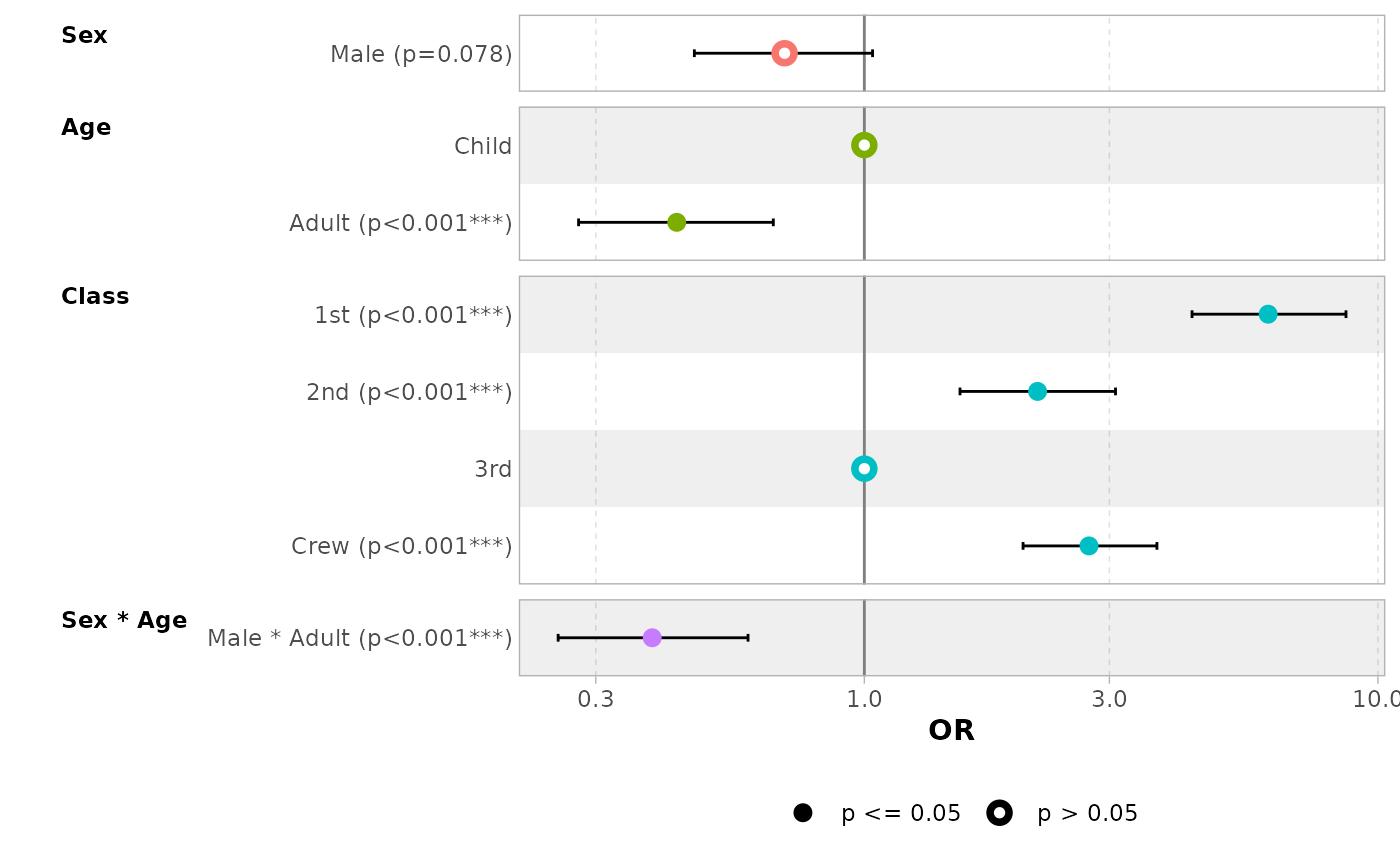
ggcoef_model(
  mod_titanic2,
  exponentiate = TRUE,
  no_reference_row = broom.helpers::all_dichotomous()
)
#> `height` was translated to `width`.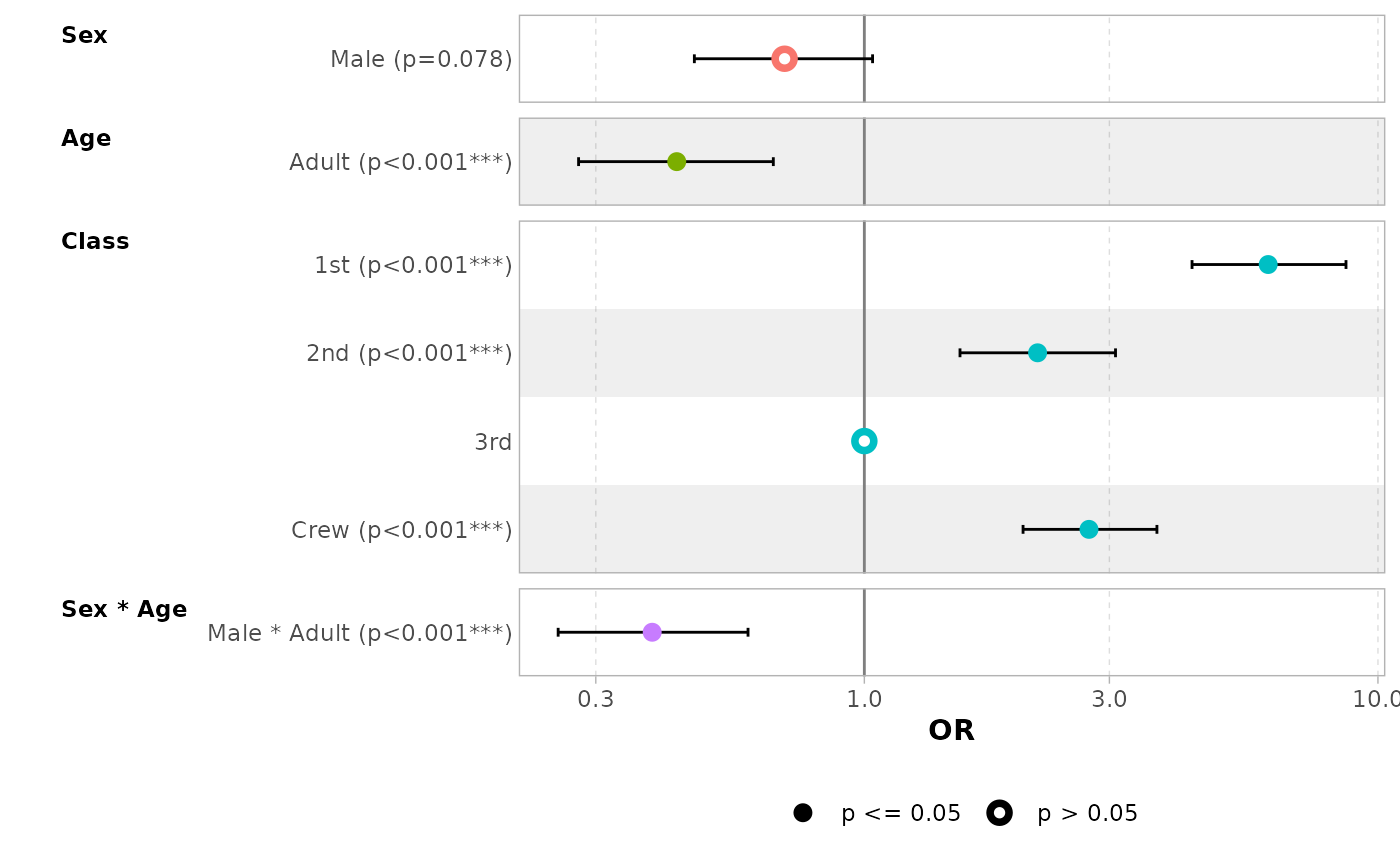
ggcoef_model(
  mod_titanic2,
  exponentiate = TRUE,
  no_reference_row = broom.helpers::all_categorical(),
  categorical_terms_pattern = "{level}/{reference_level}"
)
#> `height` was translated to `width`.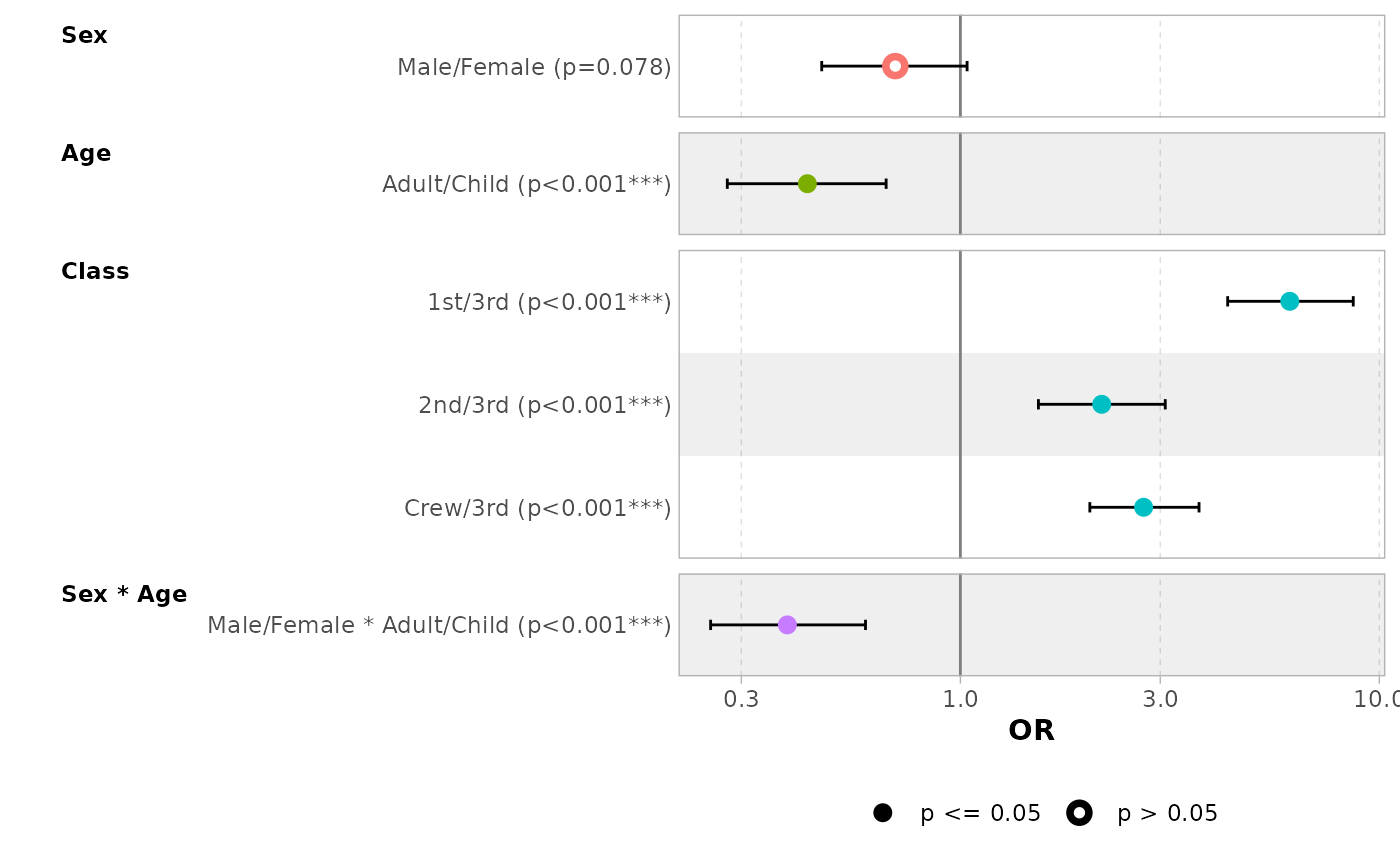
Elements to display
Use intercept = TRUE to display intercepts.
ggcoef_model(mod_simple, intercept = TRUE)
#> `height` was translated to `width`.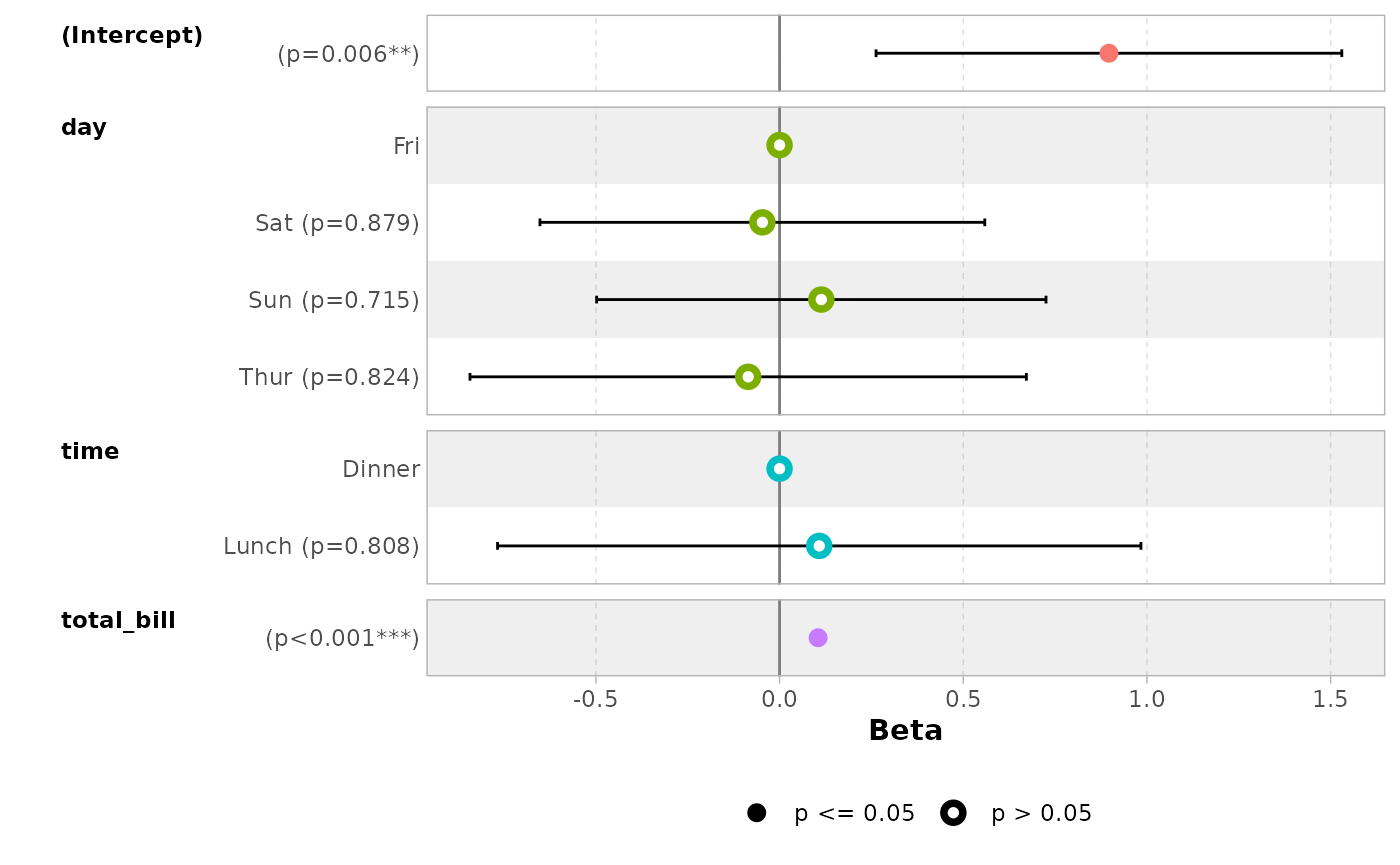
You can remove confidence intervals with
conf.int = FALSE.
ggcoef_model(mod_simple, conf.int = FALSE)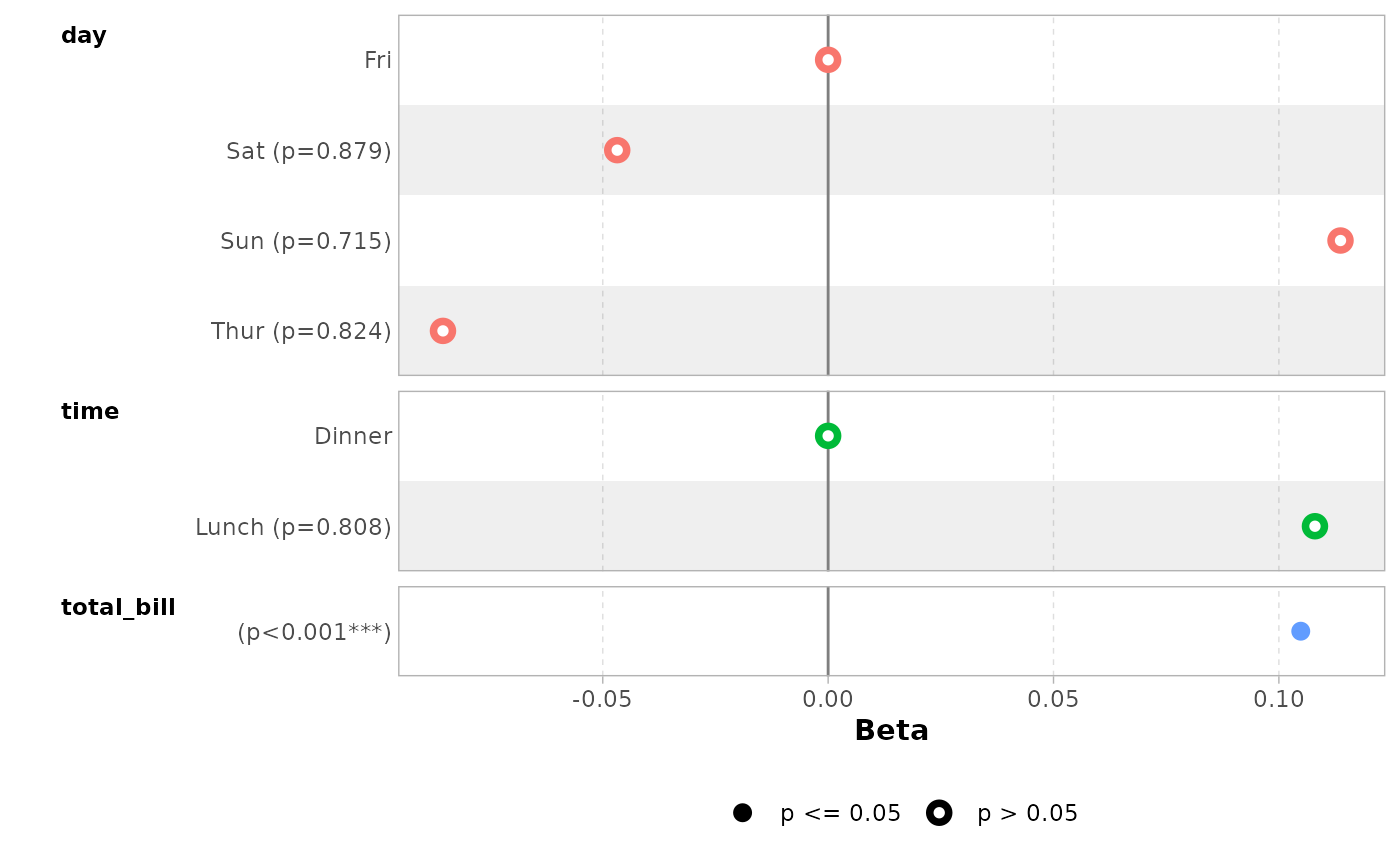
By default, significant terms (i.e. with a p-value below 5%) are
highlighted using two types of dots. You can control the level of
significance with significance or remove it with
significance = NULL.
ggcoef_model(mod_simple, significance = NULL)
#> `height` was translated to `width`.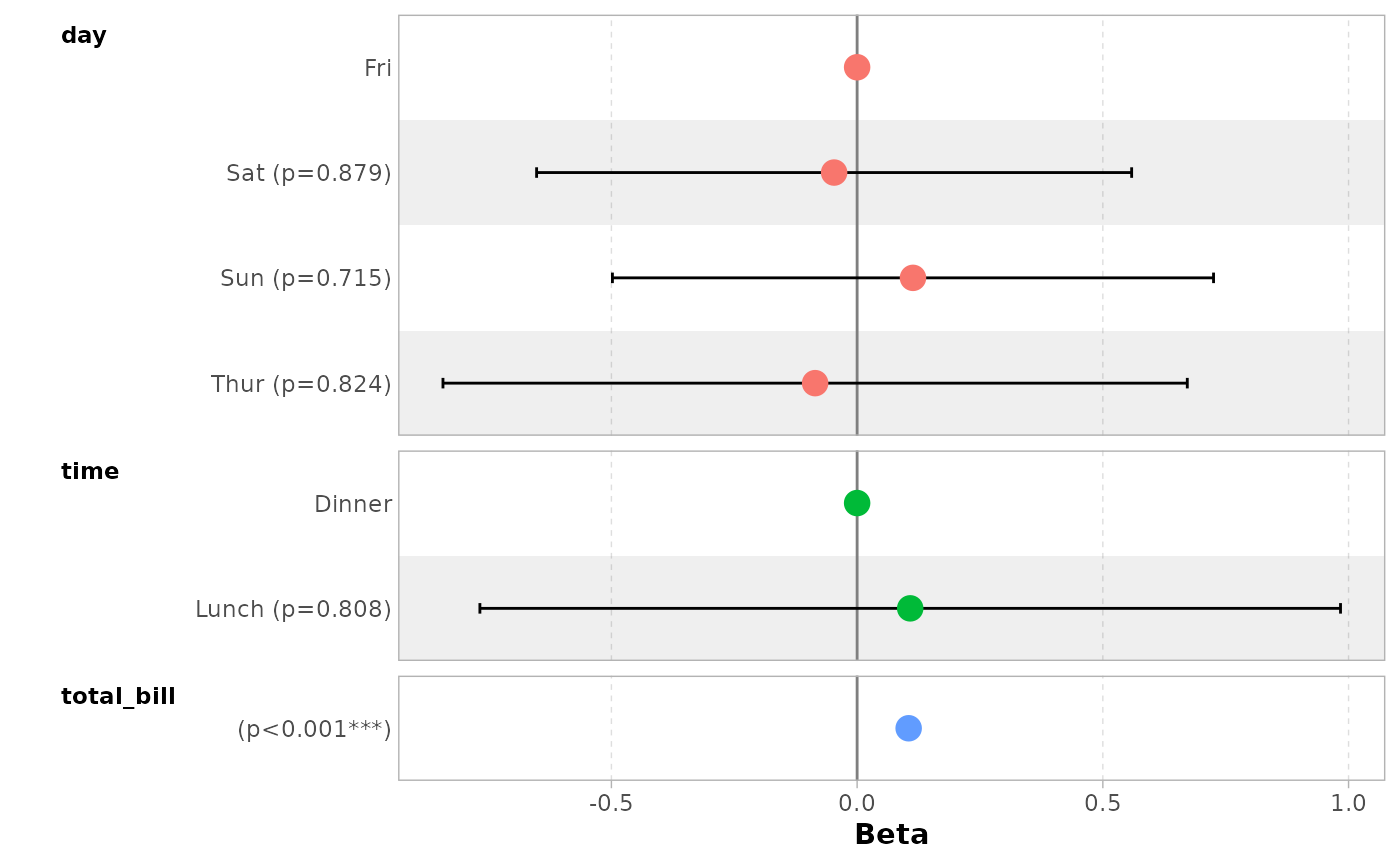
By default, dots are colored by variable. You can deactivate this
behavior with colour = NULL.
ggcoef_model(mod_simple, colour = NULL)
#> `height` was translated to `width`.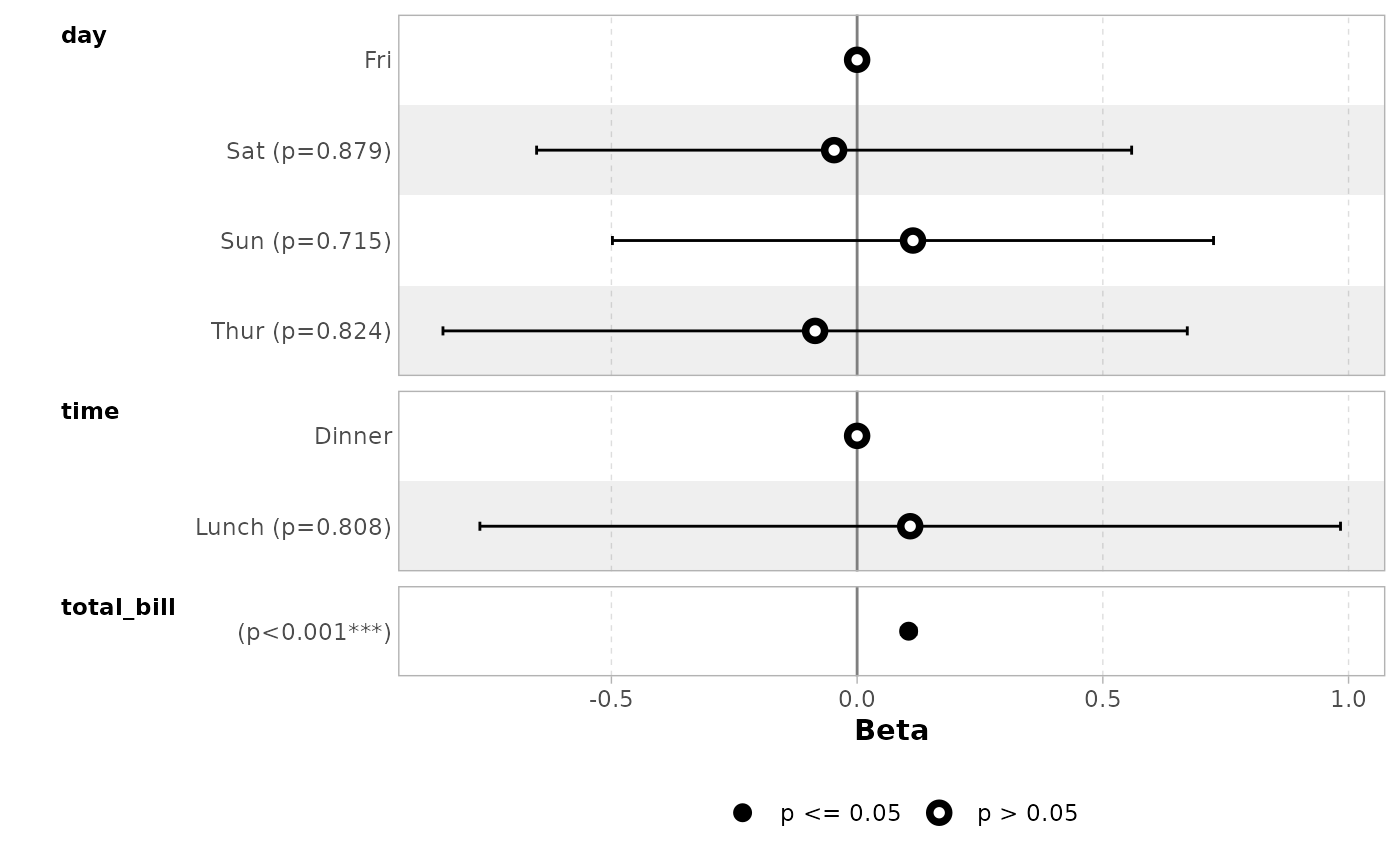
You can display only a subset of terms with include.
ggcoef_model(mod_simple, include = c("time", "total_bill"))
#> `height` was translated to `width`.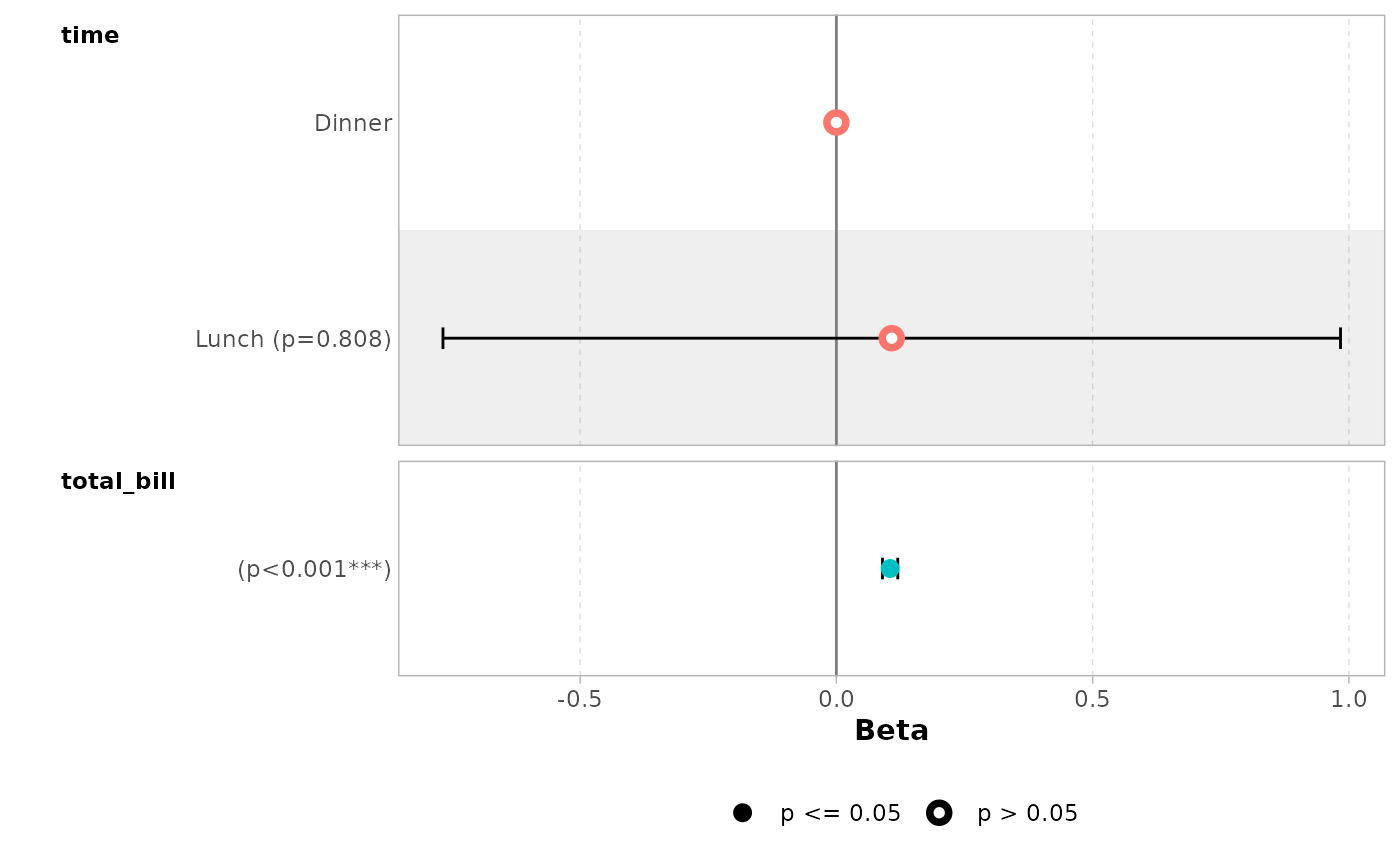
It is possible to use tidyselect helpers.
ggcoef_model(mod_simple, include = dplyr::starts_with("t"))
#> `height` was translated to `width`.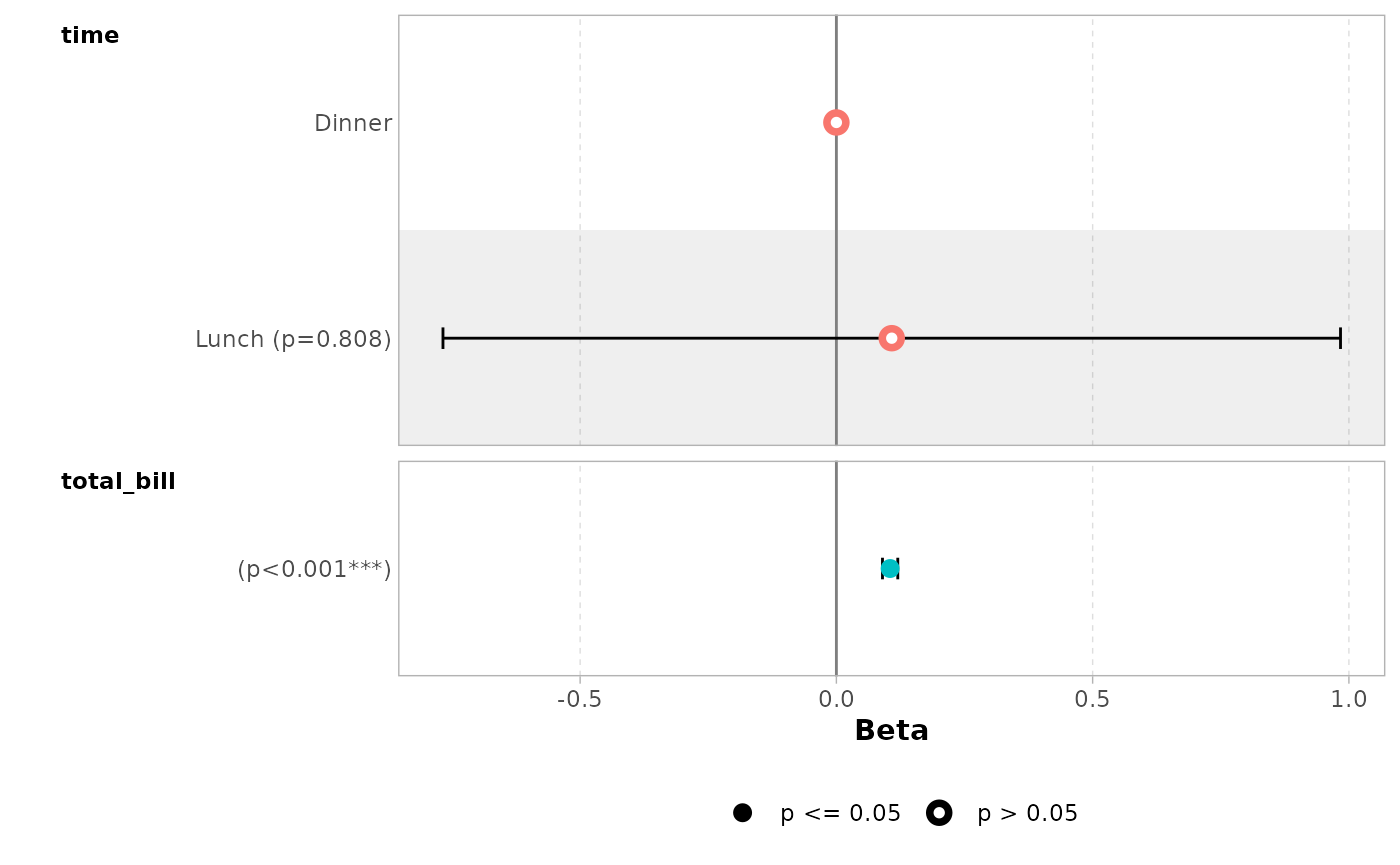
You can remove stripped rows with
stripped_rows = FALSE.
ggcoef_model(mod_simple, stripped_rows = FALSE)
#> `height` was translated to `width`.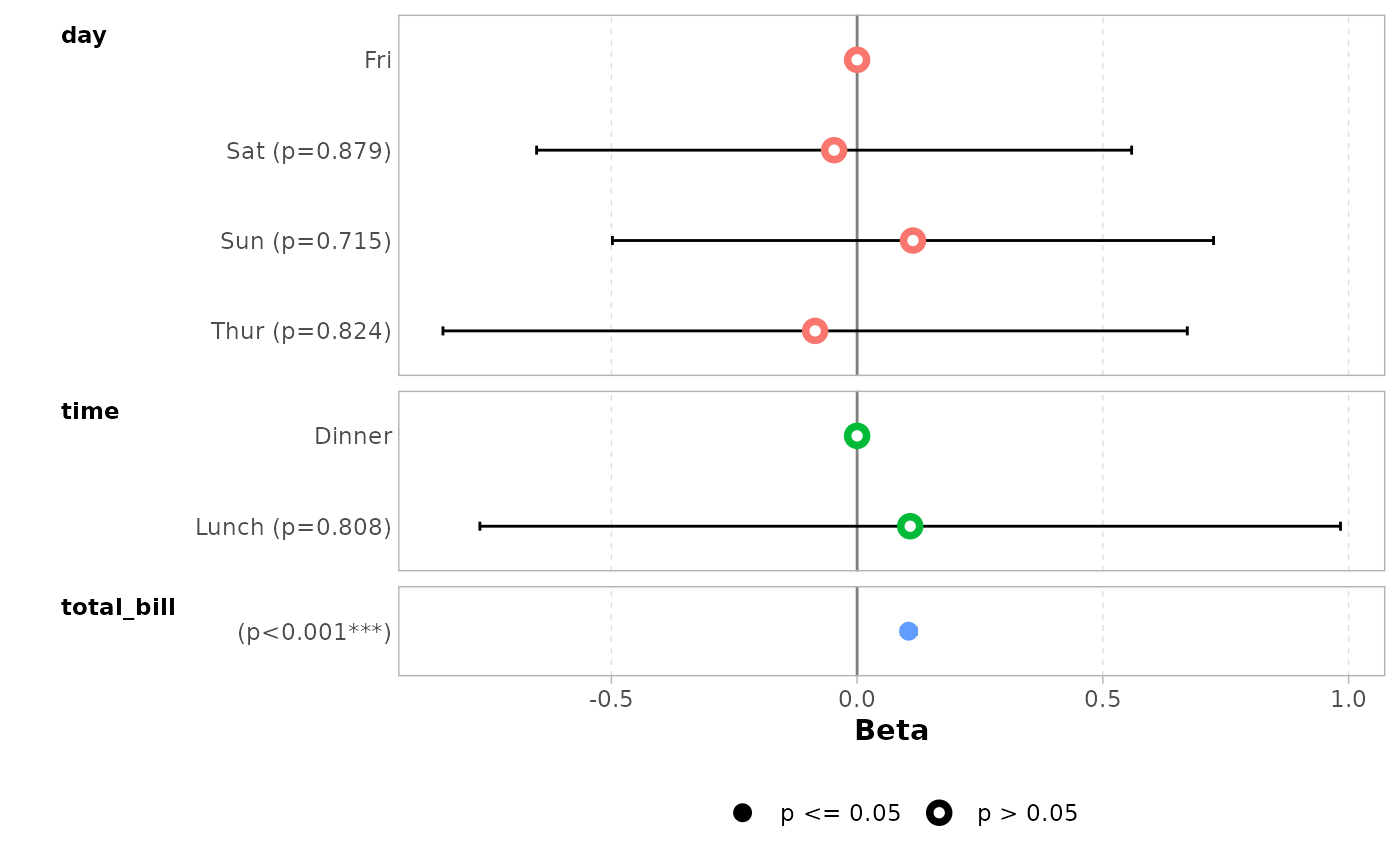
Do not hesitate to consult the help file of
ggcoef_model() to see all available options.
ggplot2 elements
The plot returned by ggcoef_model() is a classic
ggplot2 plot. You can therefore apply ggplot2
functions to it.
ggcoef_model(mod_simple) +
  ggplot2::xlab("Coefficients") +
  ggplot2::ggtitle("Custom title") +
  ggplot2::scale_color_brewer(palette = "Set1") +
  ggplot2::theme(legend.position = "right")
#> Scale for colour is already present.
#> Adding another scale for colour, which will replace the existing scale.
#> `height` was translated to `width`.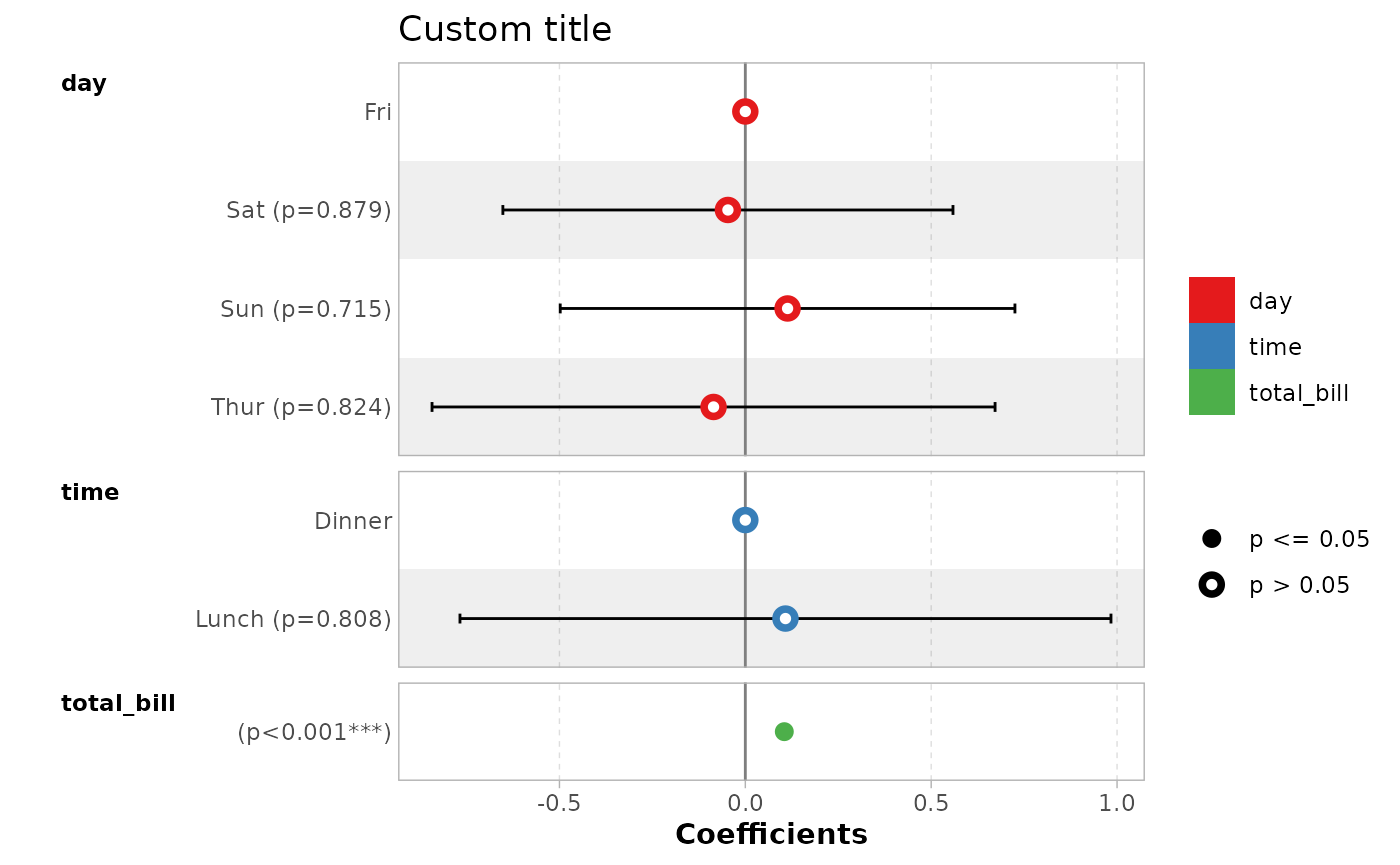
Forest plot with a coefficient table
ggcoef_table() is a variant of
ggcoef_model() displaying a coefficient table on the right
of the forest plot.
ggcoef_table(mod_simple)
#> `height` was translated to `width`.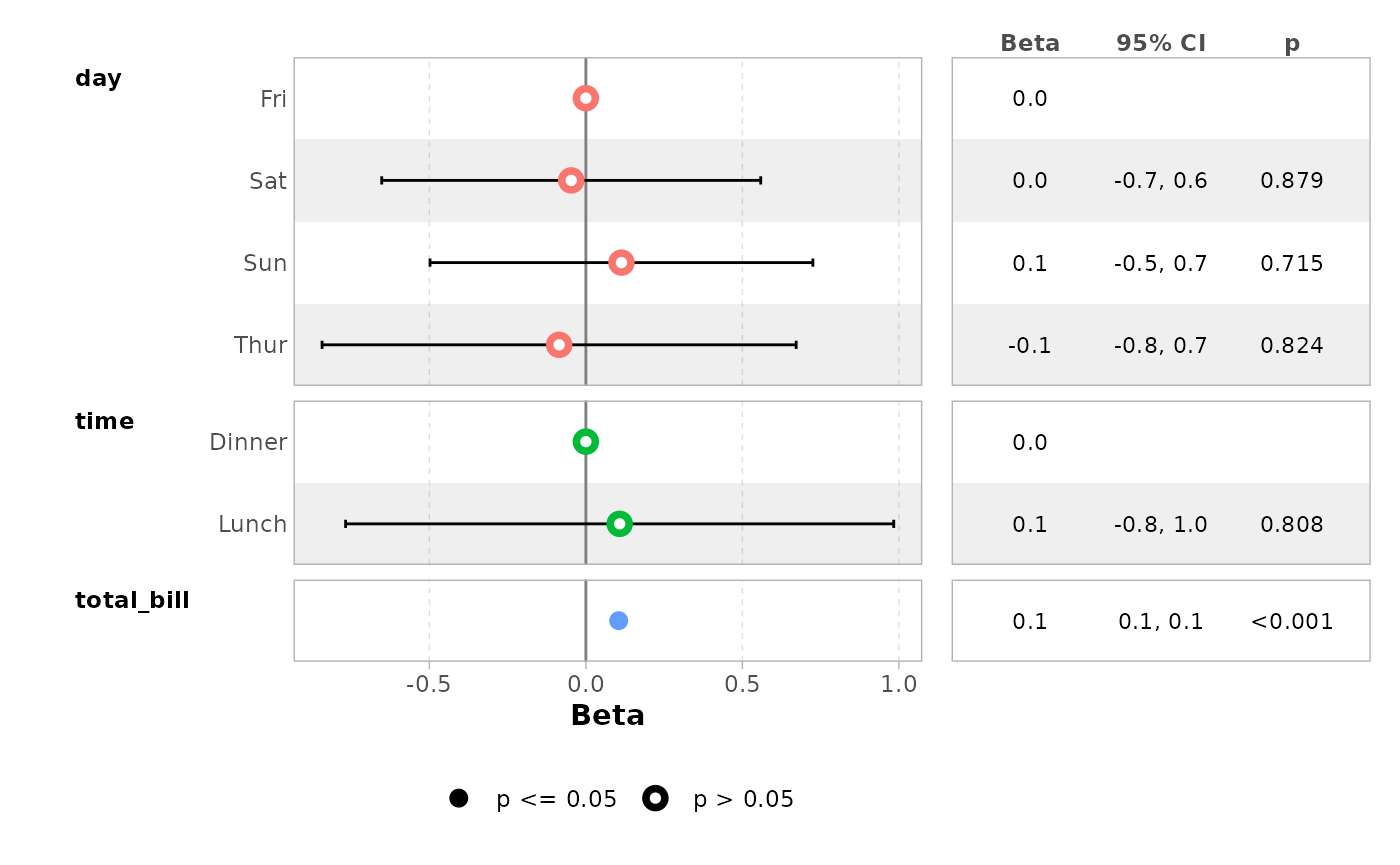
ggcoef_table(mod_titanic, exponentiate = TRUE)
#> `height` was translated to `width`.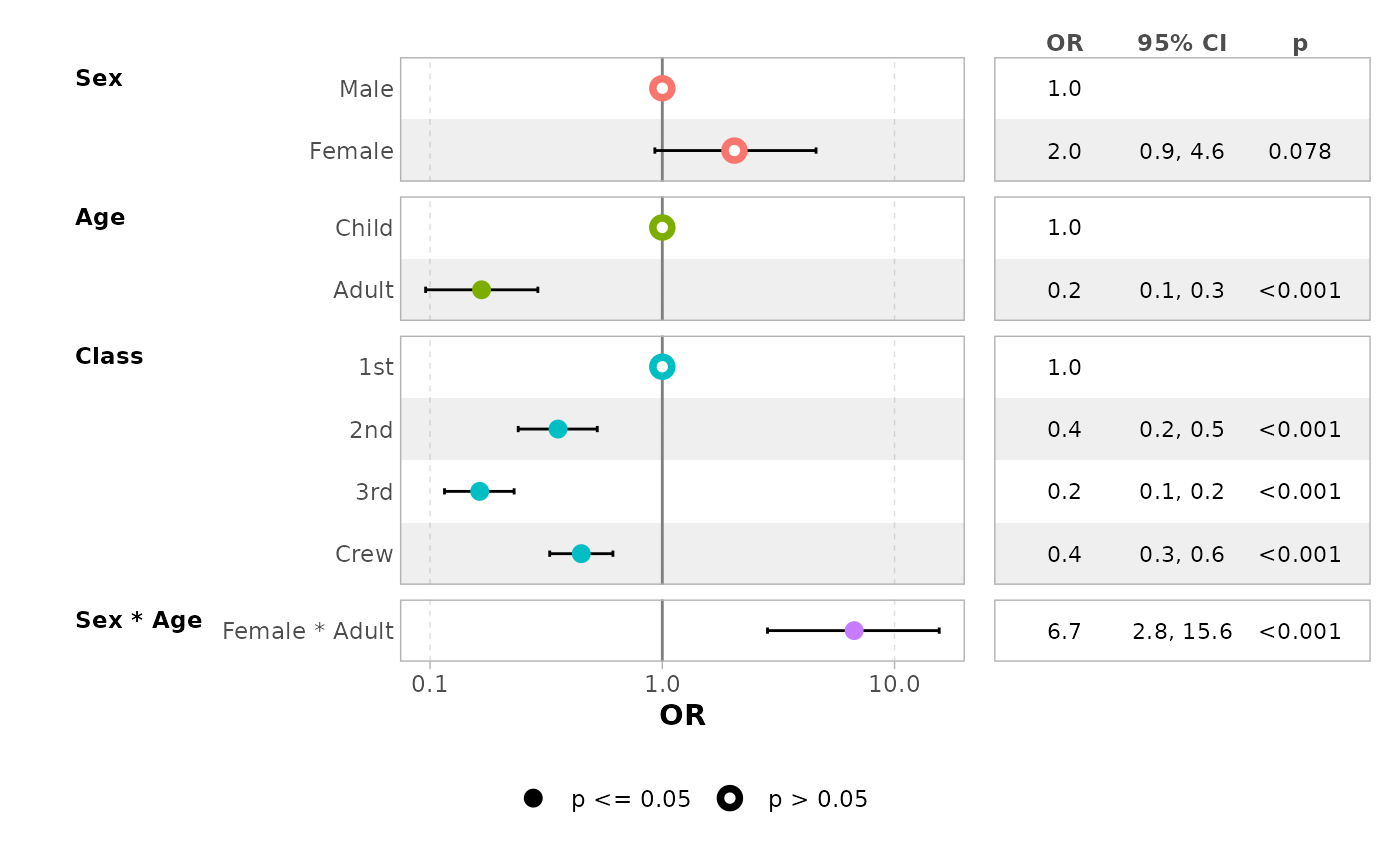
You can easily customize the columns to be displayed.
ggcoef_table(
  mod_simple,
  table_stat = c("label", "estimate", "std.error", "ci"),
  ci_pattern = "{conf.low} to {conf.high}",
  table_stat_label = list(
    estimate = scales::label_number(accuracy = .001),
    conf.low = scales::label_number(accuracy = .01),
    conf.high = scales::label_number(accuracy = .01),
    std.error = scales::label_number(accuracy = .001),
    label = toupper
  ),
  table_header = c("Term", "Coef.", "SE", "CI"),
  table_witdhs = c(2, 3)
)
#> `height` was translated to `width`.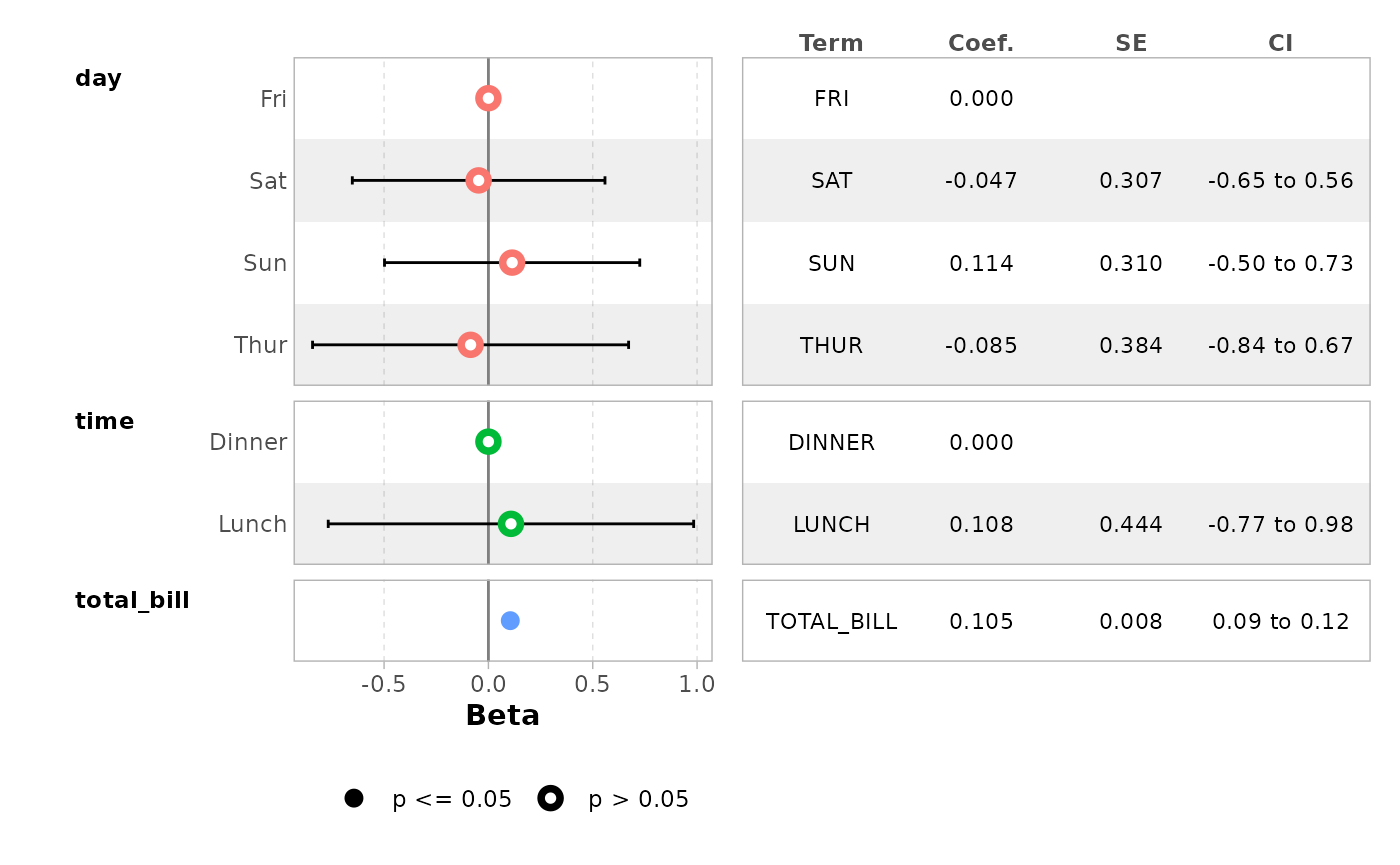
Multinomial models
For multinomial models, simply use ggcoef_multinom().
Three types of visualizations are available: "dodged",
"faceted" and "table".
library(nnet)
hec <- as.data.frame(HairEyeColor)
mod <- multinom(
  Hair ~ Eye + Sex,
  data = hec,
  weights = hec$Freq
)
#> # weights:  24 (15 variable)
#> initial  value 820.686262
#> iter  10 value 669.061500
#> iter  20 value 658.888977
#> final  value 658.885327
#> converged
ggcoef_multinom(
  mod,
  exponentiate = TRUE
)
#> `height` was translated to `width`.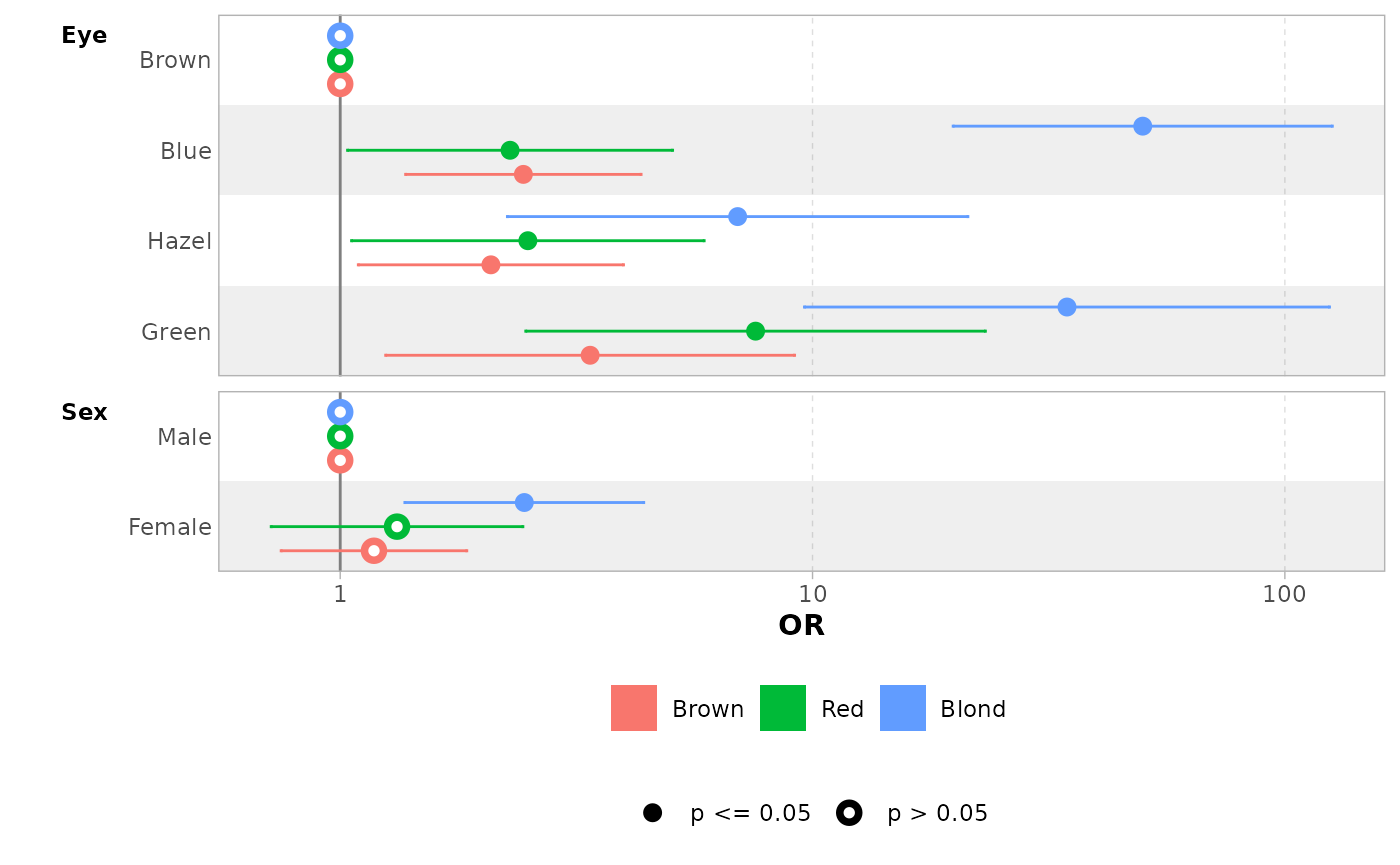
ggcoef_multinom(
  mod,
  exponentiate = TRUE,
  type = "faceted"
)
#> `height` was translated to `width`.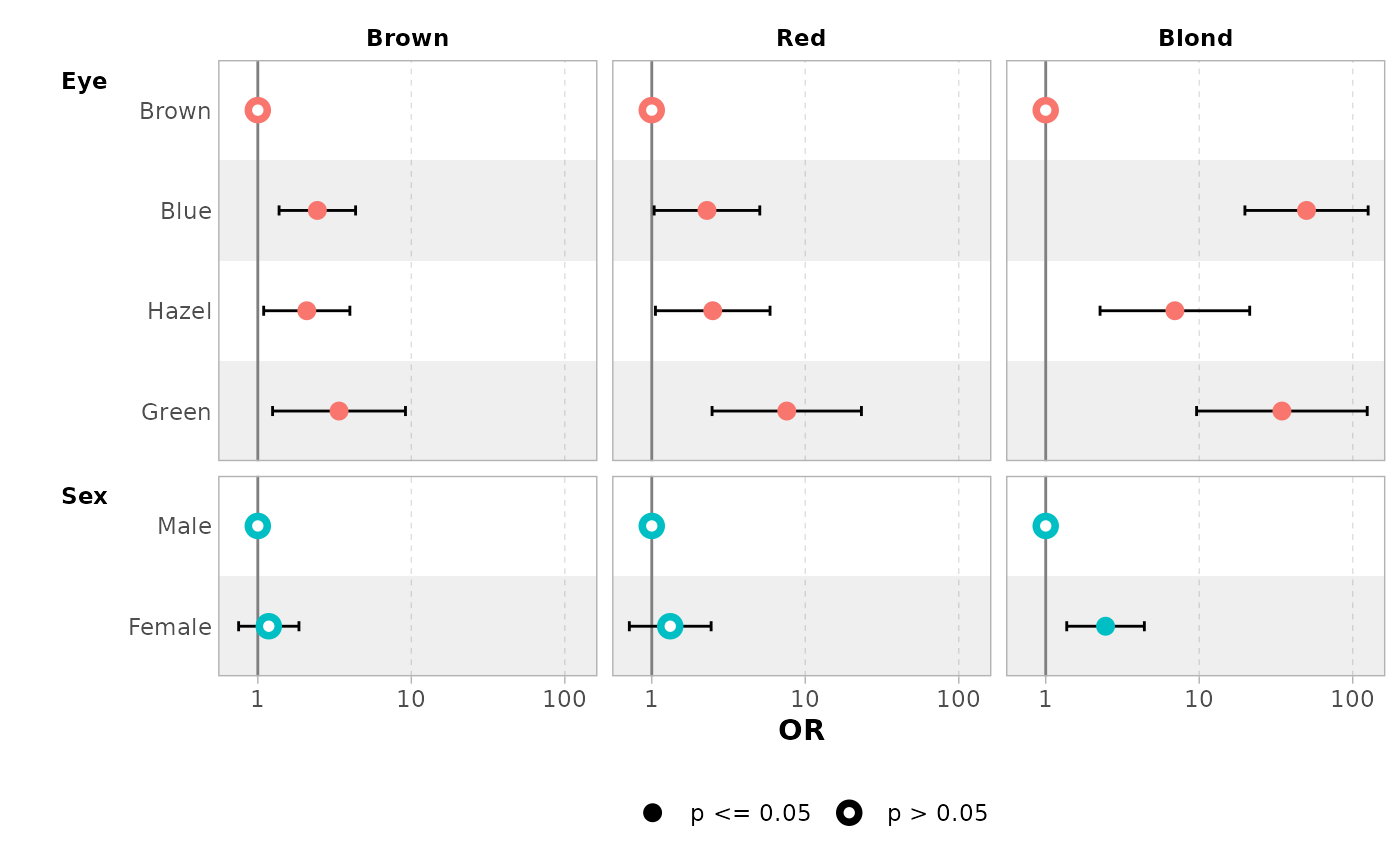
ggcoef_multinom(
  mod,
  exponentiate = TRUE,
  type = "table"
)
#> `height` was translated to `width`.
#> `height` was translated to `width`.
#> `height` was translated to `width`.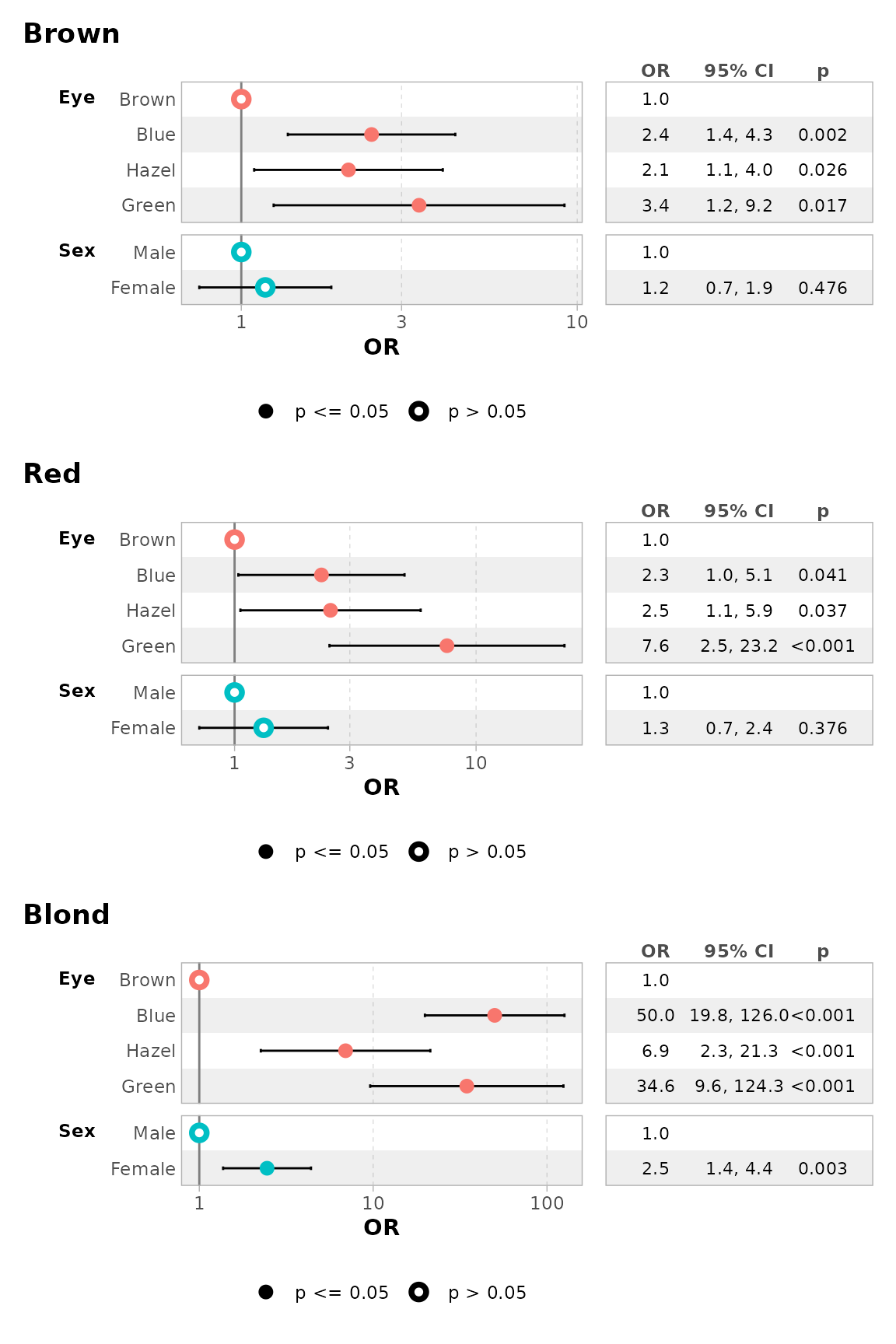
You can use y.level_label to customize the label of each
level.
ggcoef_multinom(
  mod,
  type = "faceted",
  y.level_label = c("Brown" = "Brown\n(ref: Black)"),
  exponentiate = TRUE
)
#> `height` was translated to `width`.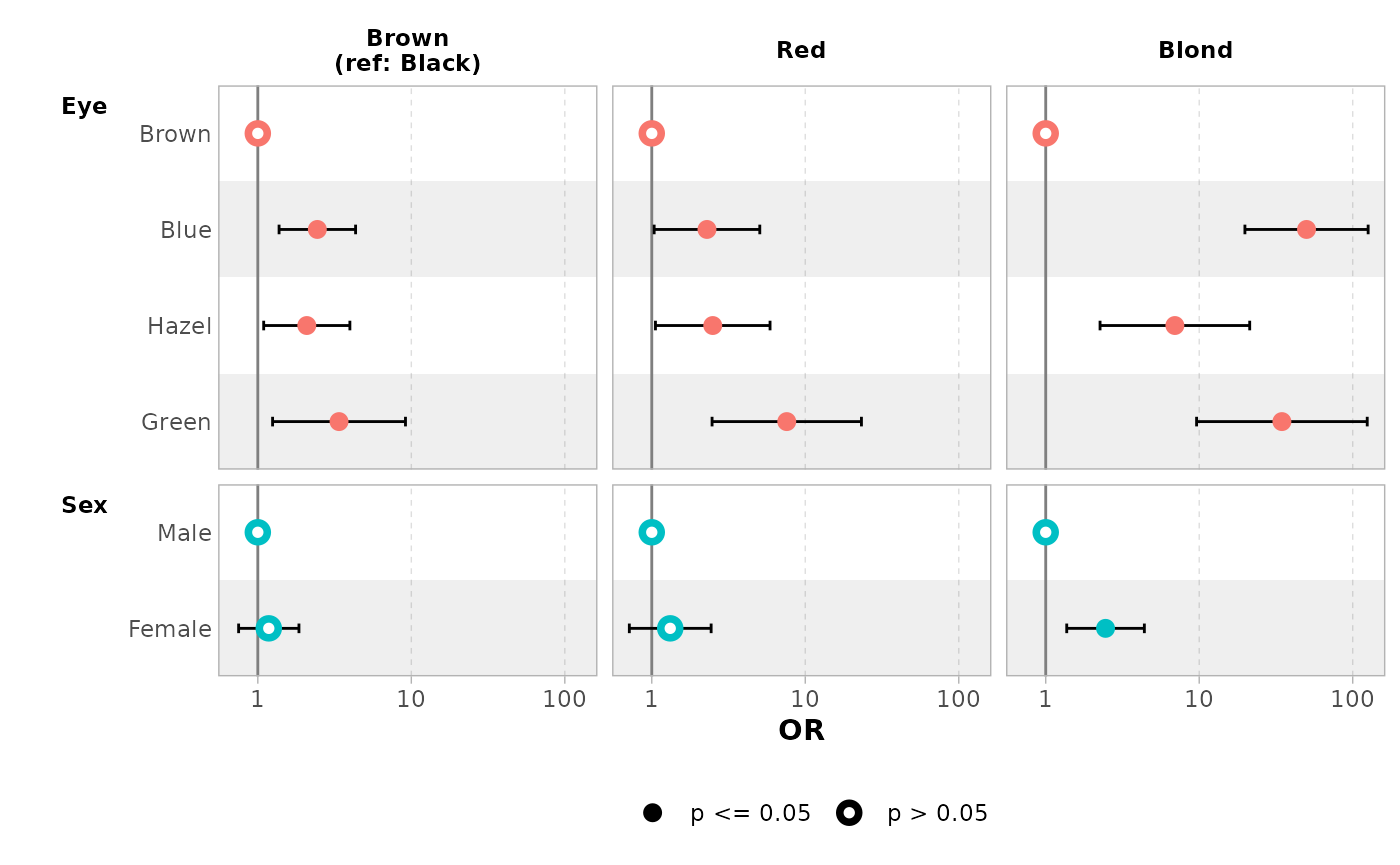
Multi-components models
Multi-components models such as zero-inflated Poisson or beta
regression generate a set of terms for each of their components. You can
use ggcoef_multicomponents() which is similar to
ggcoef_multinom().
library(pscl)
#> Classes and Methods for R originally developed in the
#> Political Science Computational Laboratory
#> Department of Political Science
#> Stanford University (2002-2015),
#> by and under the direction of Simon Jackman.
#> hurdle and zeroinfl functions by Achim Zeileis.
data("bioChemists", package = "pscl")
mod <- zeroinfl(art ~ fem * mar | fem + mar, data = bioChemists)

ggcoef_multicomponents(mod)
#> ℹ <zeroinfl> model detected.
#> ✔ `tidy_zeroinfl()` used instead.
#> ℹ Add `tidy_fun = broom.helpers::tidy_zeroinfl` to quiet these messages.
#> `height` was translated to `width`.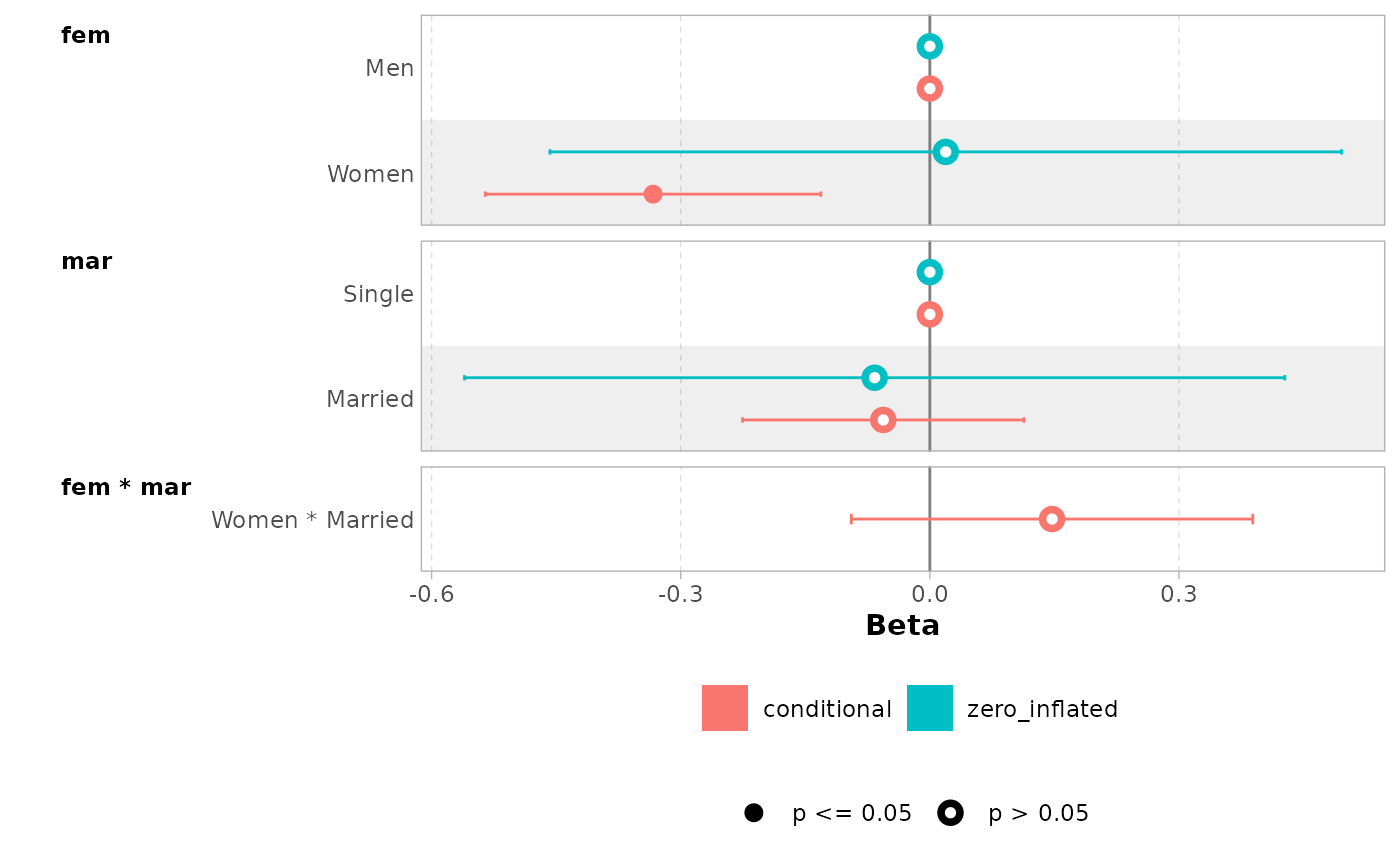
ggcoef_multicomponents(mod, type = "f")
#> ℹ <zeroinfl> model detected.
#> ✔ `tidy_zeroinfl()` used instead.
#> ℹ Add `tidy_fun = broom.helpers::tidy_zeroinfl` to quiet these messages.
#> `height` was translated to `width`.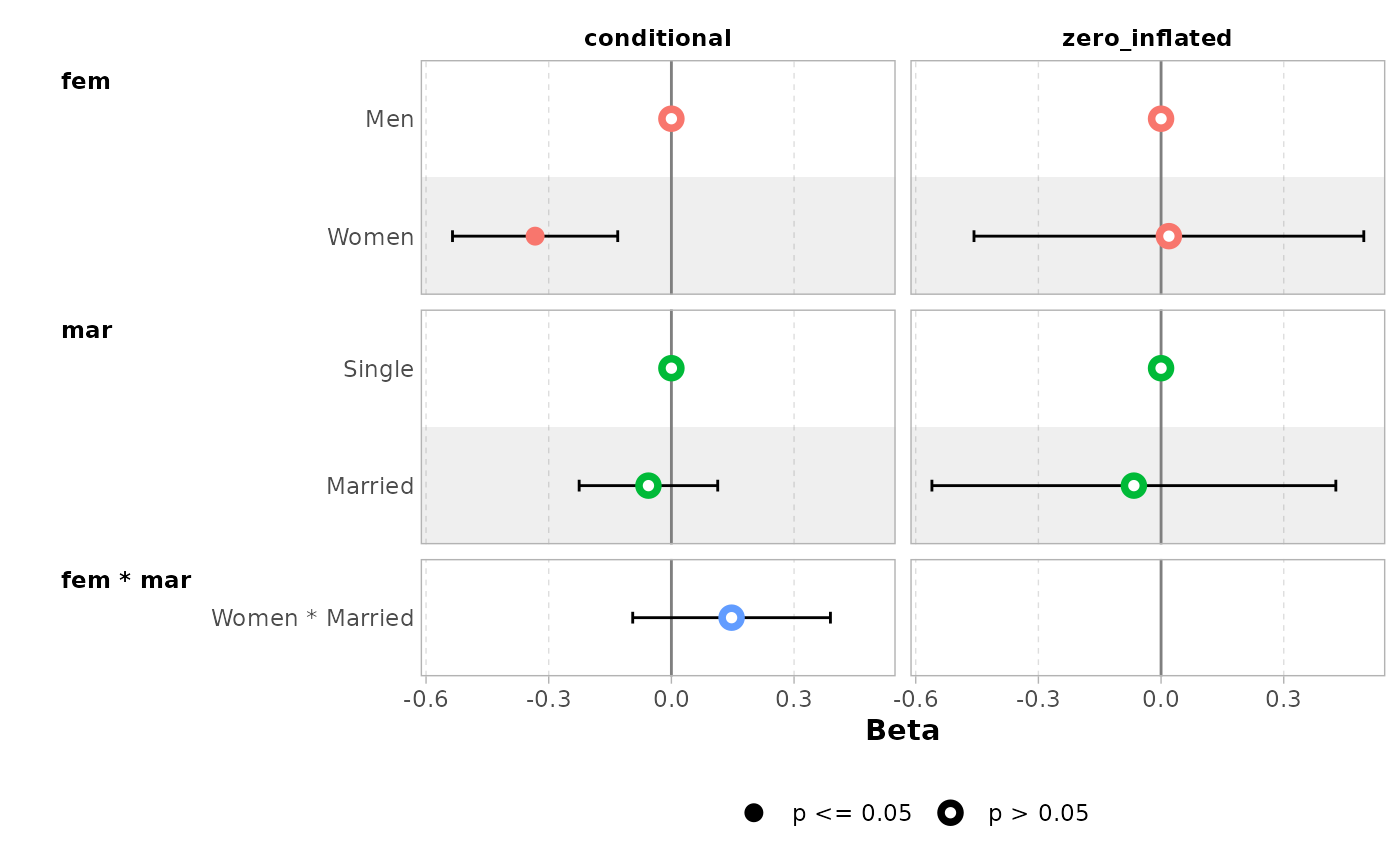
ggcoef_multicomponents(mod, type = "t")
#> ℹ <zeroinfl> model detected.
#> ✔ `tidy_zeroinfl()` used instead.
#> ℹ Add `tidy_fun = broom.helpers::tidy_zeroinfl` to quiet these messages.
#> `height` was translated to `width`.
#> `height` was translated to `width`.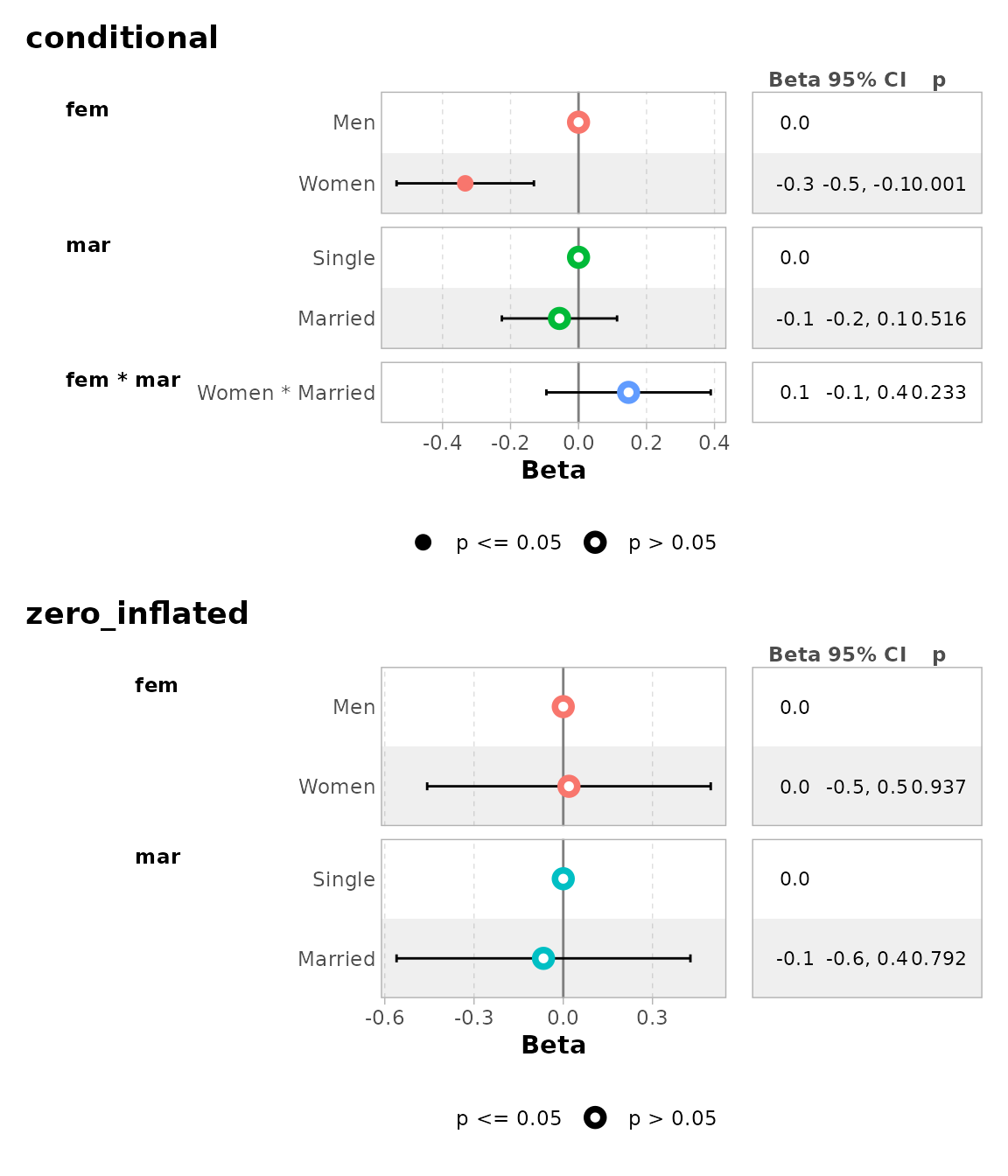
ggcoef_multicomponents(
  mod,
  type = "t",
  component_label = c(conditional = "Count", zero_inflated = "Zero-inflated")
)
#> ℹ <zeroinfl> model detected.
#> ✔ `tidy_zeroinfl()` used instead.
#> ℹ Add `tidy_fun = broom.helpers::tidy_zeroinfl` to quiet these messages.
#> `height` was translated to `width`.`height` was translated to `width`.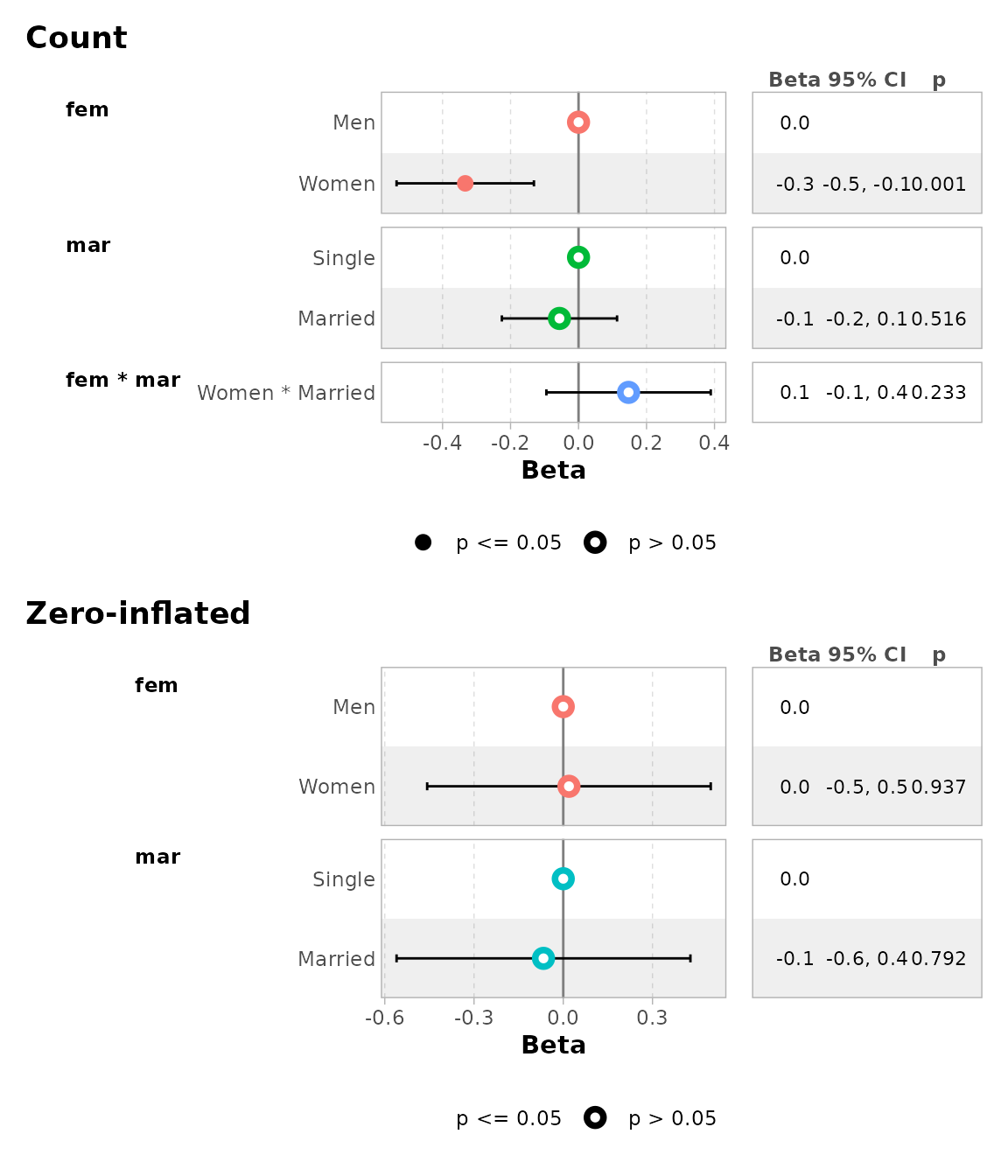
Comparing several models
You can easily compare several models with
ggcoef_compare(). To be noted,
ggcoef_compare() is not compatible with multinomial or
multi-components models.
mod1 <- lm(Fertility ~ ., data = swiss)
mod2 <- step(mod1, trace = 0)
mod3 <- lm(Fertility ~ Agriculture + Education * Catholic, data = swiss)
models <- list(
  "Full model" = mod1,
  "Simplified model" = mod2,
  "With interaction" = mod3
)

ggcoef_compare(models)
#> `height` was translated to `width`.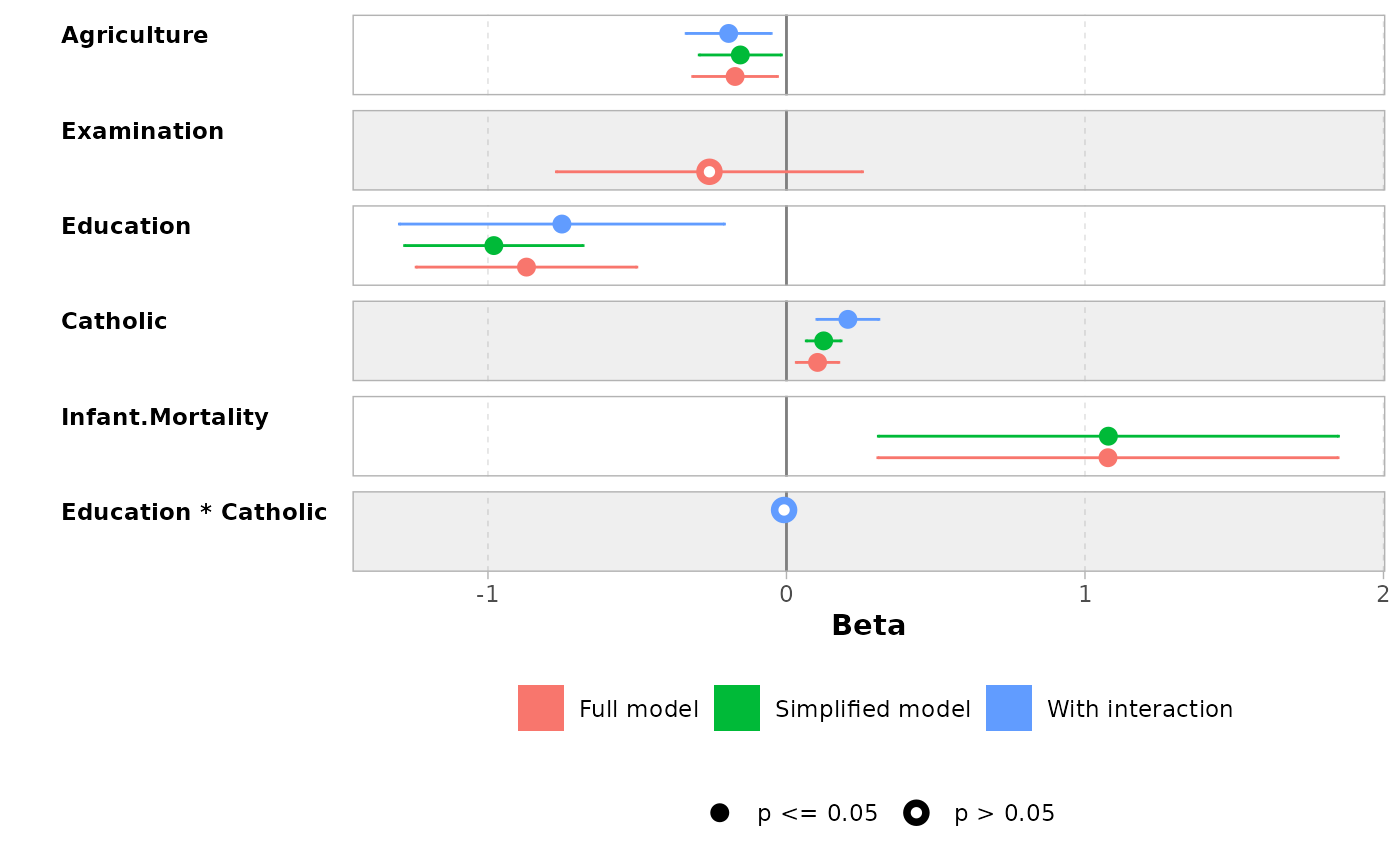
ggcoef_compare(models, type = "faceted")
#> `height` was translated to `width`.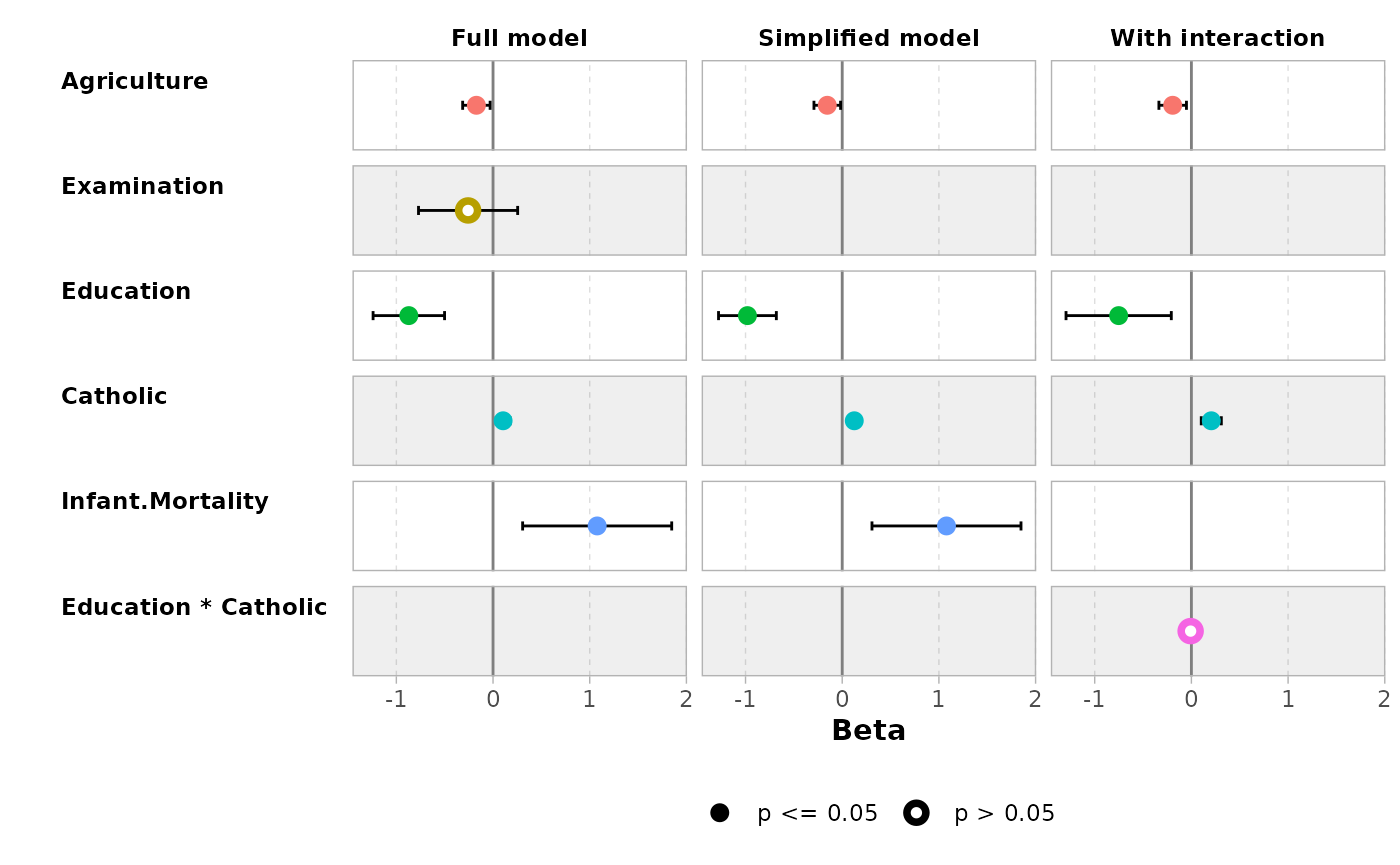
Advanced users
Advanced users could use their own dataset and pass it to
ggcoef_plot(). Such dataset could be produced by
ggcoef_model(), ggcoef_compare() or
ggcoef_multinom() with the option
return_data = TRUE or by using broom::tidy()
or broom.helpers::tidy_plus_plus().
Supported models
| model | notes |
|---|---|
betareg::betareg() |
Use tidy_parameters() as
tidy_fun with component argument to control
with coefficients to return. broom::tidy() does not support
the exponentiate argument for betareg models, use
tidy_parameters() instead. |
biglm::bigglm() |
|
brms::brm() |
broom.mixed package required |
cmprsk::crr() |
Limited support. It is recommended to use
tidycmprsk::crr() instead. |
fixest::feglm() |
May fail with R <= 4.0. |
fixest::femlm() |
May fail with R <= 4.0. |
fixest::feNmlm() |
May fail with R <= 4.0. |
fixest::feols() |
May fail with R <= 4.0. |
gam::gam() |
|
geepack::geeglm() |
|
glmmTMB::glmmTMB() |
broom.mixed package required |
glmtoolbox::glmgee() |
|
lavaan::lavaan() |
Limited support for categorical variables |
lfe::felm() |
|
lme4::glmer.nb() |
broom.mixed package required |
lme4::glmer() |
broom.mixed package required |
lme4::lmer() |
broom.mixed package required |
logitr::logitr() |
Requires logitr >= 0.8.0 |
MASS::glm.nb() |
|
MASS::polr() |
|
mgcv::gam() |
Use default tidier broom::tidy() for
smooth terms only, or gtsummary::tidy_gam() to include
parametric terms |
mice::mira |
Limited support. If mod is a
mira object, use
tidy_fun = function(x, ...) {mice::pool(x) |> mice::tidy(...)}
|
mmrm::mmrm() |
|
multgee::nomLORgee() |
Use tidy_multgee() as
tidy_fun. |
multgee::ordLORgee() |
Use tidy_multgee() as
tidy_fun. |
nnet::multinom() |
|
ordinal::clm() |
Limited support for models with nominal predictors. |
ordinal::clmm() |
Limited support for models with nominal predictors. |
parsnip::model_fit |
Supported as long as the type of model and the engine is supported. |
plm::plm() |
|
pscl::hurdle() |
Use tidy_zeroinfl() as
tidy_fun. |
pscl::zeroinfl() |
Use tidy_zeroinfl() as
tidy_fun. |
quantreg::rq() |
If several quantiles are estimated, use
tidy_with_broom_or_parameters() tidier, the default tidier
used by tidy_plus_plus(). |
rstanarm::stan_glm() |
broom.mixed package required |
stats::aov() |
Reference rows are not relevant for such models. |
stats::glm() |
|
stats::lm() |
|
stats::nls() |
Limited support |
survey::svycoxph() |
|
survey::svyglm() |
|
survey::svyolr() |
|
survival::cch() |
Experimental support. |
survival::clogit() |
|
survival::coxph() |
|
survival::survreg() |
|
svyVGAM::svy_vglm() |
Experimental support. It is recommended to use
tidy_svy_vglm() as tidy_fun. |
tidycmprsk::crr() |
|
VGAM::vgam() |
Experimental support. It is recommended to use
tidy_vgam() as tidy_fun. |
VGAM::vglm() |
Experimental support. It is recommended to use
tidy_vgam() as tidy_fun. |
Note: this list of models has been tested.
broom.helpers, and therefore ggcoef_model(),
may or may not work properly or partially with other types of
models.