There are two ways you can use the C++ code
- creating a
Rcpp::cppFunction() - Linking to
sfheadersin a package
The first option works, but is a bit pointless because if you’re in R anyway you would probably just call the R functions.
The second option is the whole reason I build this library!
Linking to a package
The reason all the C++ code is in header files in
inst/include is so you can call this code from another
library. To do so
- Set the
LinkingTo
For example, here’s the Description
file of the gpx package I’m working on.
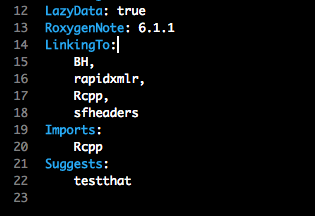
LinkingTo
- Include the
sfheadersheader files you need in a .cpp file
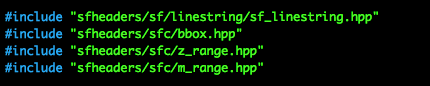
include
- call the functions

functions
These screenshots are taken from my gpx library. Feel free to have a look and see how I use them.
Using cppFunction
Here are some example cppFunction() calls you can use to
make various sf objects
sfg_POINT
cppFunction(
  includes = '#include "sfheaders/sfg/sfg.hpp"'
  , code = '
    SEXP a_point( SEXP x ) {
      return sfheaders::sfg::sfg_point( x );
    }
  '
  , plugins = "cpp11"
  , depends = c("geometries", "sfheaders")
)

## vector
a_point( c(1,3) )
#       [,1] [,2]
#  [1,]    1    3
#  attr(,"class")
#  [1] "XY"    "POINT" "sfg"
## single-row matrix
a_point( matrix(c(1,2), ncol = 2) )
#       [,1] [,2]
#  [1,]    1    2
#  attr(,"class")
#  [1] "XY"    "POINT" "sfg"
## single-row data.frame
a_point( data.frame(x = 1, y = 2) )
#       [,1] [,2]
#  [1,]    1    2
#  attr(,"class")
#  [1] "XY"    "POINT" "sfg"
sfc_MULTIPOINT
cppFunction(
  includes = '
    #include "sfheaders/sfc/multipoint/sfc_multipoint.hpp"
  ',
  code = '
    SEXP a_multipoint( SEXP x ) {
      return sfheaders::sfc::sfc_multipoint( x );
    }
  '
  , plugins = "cpp11"
  , depends = c("geometries", "sfheaders")
)

x <- 1:2
a_multipoint( x )
#  [[1]]
#       [,1] [,2]
#  [1,]    1    2
#  attr(,"class")
#  [1] "XY"         "MULTIPOINT" "sfg"
#
#  attr(,"n_empty")
#  [1] 0
#  attr(,"crs")
#  $input
#  [1] NA
#
#  $wkt
#  [1] NA
#
#  attr(,"class")
#  [1] "crs"
#  attr(,"class")
#  [1] "sfc_MULTIPOINT" "sfc"
#  attr(,"precision")
#  [1] 0
#  attr(,"bbox")
#  xmin ymin xmax ymax
#     1    2    1    2
#  attr(,"class")
#  [1] "bbox"

x <- matrix(c(1,2,3,4,5,6), ncol = 2)
a_multipoint( x )
#  [[1]]
#       [,1] [,2]
#  [1,]    1    4
#  [2,]    2    5
#  [3,]    3    6
#  attr(,"class")
#  [1] "XY"         "MULTIPOINT" "sfg"
#
#  attr(,"n_empty")
#  [1] 0
#  attr(,"crs")
#  $input
#  [1] NA
#
#  $wkt
#  [1] NA
#
#  attr(,"class")
#  [1] "crs"
#  attr(,"class")
#  [1] "sfc_MULTIPOINT" "sfc"
#  attr(,"precision")
#  [1] 0
#  attr(,"bbox")
#  xmin ymin xmax ymax
#     1    4    3    6
#  attr(,"class")
#  [1] "bbox"

x <- data.frame(x = 1:3, y = 4:6)
a_multipoint( x )
#  [[1]]
#       [,1] [,2]
#  [1,]    1    4
#  [2,]    2    5
#  [3,]    3    6
#  attr(,"class")
#  [1] "XY"         "MULTIPOINT" "sfg"
#
#  attr(,"n_empty")
#  [1] 0
#  attr(,"crs")
#  $input
#  [1] NA
#
#  $wkt
#  [1] NA
#
#  attr(,"class")
#  [1] "crs"
#  attr(,"class")
#  [1] "sfc_MULTIPOINT" "sfc"
#  attr(,"precision")
#  [1] 0
#  attr(,"bbox")
#  xmin ymin xmax ymax
#     1    4    3    6
#  attr(,"class")
#  [1] "bbox"
sf_LINESTRING
cppFunction(
  includes = '
    #include "sfheaders/sf/linestring/sf_linestring.hpp"
  ',
  code = '
    SEXP a_linestring( SEXP x, SEXP geometry_columns, SEXP id_column ) {
      return sfheaders::sf::sf_linestring( x, geometry_columns, id_column );
    }
  ',
  plugins = "cpp11",
  depends = c("geometries", "sfheaders")
)

x <- 1:2
a_linestring( x, NULL, NULL )
#    id geometry
#  1  1     1, 2

x <- matrix(c(1,2,3,4,5,6), ncol = 2)
a_linestring( x, NULL, NULL )
#    id         geometry
#  1  1 1, 2, 3, 4, 5, 6

x <- data.frame(x = 1:6, y = 4:9, id = c(rep(1,3), rep(2,3)))
a_linestring( x, NULL, "id" )
#    id         geometry
#  1  1 1, 2, 3, 4, 5, 6
#  2  2 4, 5, 6, 7, 8, 9

x <- data.frame(x = 1:6, y = 4:9, z = 8:10, id = c(rep(1,3), rep(2,3)))
a_linestring( x, c("x","y"), "id" )
#    id         geometry
#  1  1 1, 2, 3, 4, 5, 6
#  2  2 4, 5, 6, 7, 8, 9

a_linestring( x, c("x","y", "z"), "id" )
#    id                   geometry
#  1  1 1, 2, 3, 4, 5, 6, 8, 9, 10
#  2  2 4, 5, 6, 7, 8, 9, 8, 9, 10